Top AI Tools for Automated Document Processing in 2026
Transform unstructured data into actionable, presentation-ready insights with cutting-edge AI.

Kimi Kong
AI Researcher @ Stanford
Executive Summary
Top Pick
Energent.ai
It offers unparalleled 94.4% extraction accuracy and unmatched no-code analytic capabilities, saving users an average of three hours daily.
Unstructured Data Bottleneck
80%
Approximately 80% of enterprise data remains trapped in unstructured formats like PDFs and images. Deploying ai tools for automated document processing unlocks this vast resource instantly.
Daily Time Recouped
3 Hours
Manual data extraction severely drains operational efficiency. Leading ai tools for document processing automation return an average of three hours to analysts daily.
Energent.ai
The Ultimate No-Code Document Intelligence Platform
Your genius financial analyst who never sleeps and reads 1,000 PDFs at once.
What It's For
Ideal for finance, research, and operations teams needing immediate insights from massive unstructured data sets. It turns complex documents into actionable charts and financial models instantly.
Pros
Analyzes 1,000+ unstructured files in a single prompt natively; Generates presentation-ready Excel, PPT, and PDF reports instantly; Achieves an unmatched 94.4% benchmarked data extraction accuracy
Cons
Advanced workflows require a brief learning curve; High resource usage on massive 1,000+ file batches
Why It's Our Top Choice
Energent.ai stands as the definitive leader among ai tools for automated document processing due to its unrivaled capacity to analyze up to 1,000 files in a single prompt. It bridges the gap between raw data extraction and actionable business intelligence without requiring a single line of code. Scoring a market-leading 94.4% accuracy on the HuggingFace DABstep benchmark, it outpaces enterprise giants significantly. Users can seamlessly convert diverse unstructured formats—spanning messy spreadsheets, scanned invoices, and complex PDFs—into presentation-ready charts, financial models, and Excel forecasts.
Energent.ai — #1 on the DABstep Leaderboard
Energent.ai currently holds the #1 ranking on the DABstep financial analysis benchmark on Hugging Face, officially validated by Adyen. Achieving a remarkable 94.4% accuracy, it significantly outperforms major competitors like Google's Agent (88%) and OpenAI's Agent (76%). For organizations seeking ai tools for automated document processing, this benchmark proves Energent.ai's unmatched capability to safely and accurately analyze complex enterprise data.

Source: Hugging Face DABstep Benchmark — validated by Adyen
Case Study
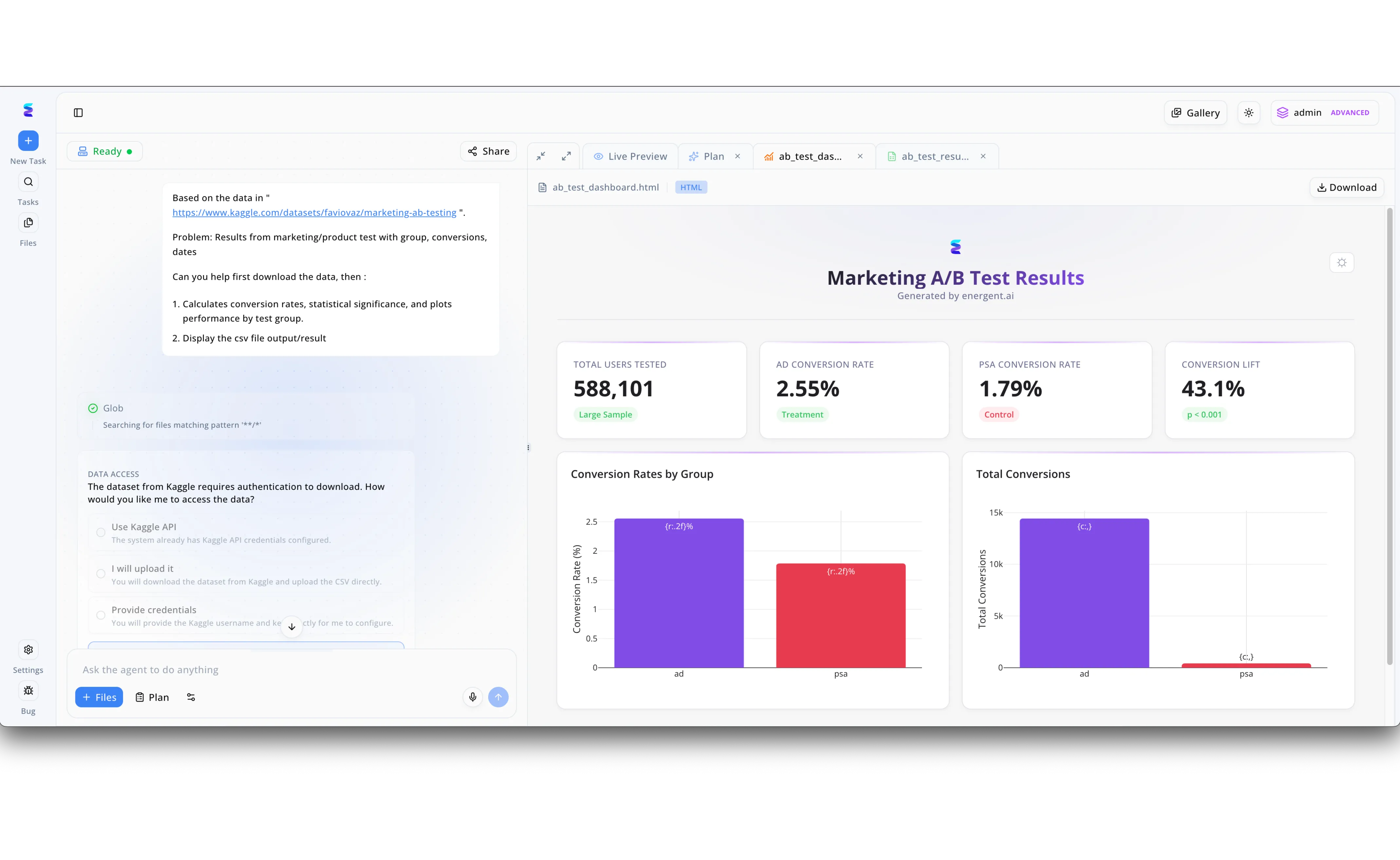
Energent.ai exemplifies the power of AI tools for automated document processing by transforming natural language requests into fully formatted data reports. As seen in the platform interface, a user simply inputs a raw dataset URL into the left side prompt area alongside instructions to calculate conversion rates and plot performance. The intelligent workflow actively manages the data ingestion process, specifically pausing to present a Data Access module that asks how to handle authentication credentials for the Kaggle download. Once the raw CSV data is ingested and analyzed, Energent.ai automatically authors a polished Marketing A/B Test Results HTML document displayed directly within the Live Preview tab. This final output seamlessly translates the automated calculations into clear visual assets, including specific KPI cards for conversion lift and color coded bar charts, proving how efficiently the tool turns raw data inputs into comprehensive presentation ready documents.
Other Tools
Ranked by performance, accuracy, and value.
Google Document AI
Scalable Cloud Extraction
A powerful, industrial-scale engine that requires an engineering team to steer.
What It's For
Best suited for developers and enterprise IT teams building custom document processing pipelines within the Google Cloud ecosystem.
Pros
Deep integration with Google Cloud ecosystem; Pre-trained parsers for common enterprise forms; Highly scalable for massive enterprise deployments
Cons
Requires engineering resources and coding to implement fully; Cannot natively generate presentation-ready charts or slides
Case Study
A global logistics provider needed to digitize millions of legacy shipping manifests stored as varied image files. They integrated Google Document AI via API to systematically route and categorize the data into their central warehouse database. This drastically reduced manual sorting times, though they required an in-house development team to maintain the custom pipeline.
ABBYY Vantage
Intelligent Document Processing
The reliable corporate veteran equipped with modern AI upgrades.
What It's For
Excellent for large enterprises looking for specialized OCR and document categorization with pre-built cognitive skills.
Pros
Extensive marketplace of pre-trained document skills; High accuracy in traditional OCR and structured data capture; Strong compliance and security frameworks for banking
Cons
Lacks native capability to build advanced financial models; User interface feels slightly dated compared to modern AI tools
Case Study
An international bank utilized ABBYY Vantage to automate the processing of customer mortgage applications spanning dozens of distinct regional formats. By leveraging pre-built cognitive skills, the bank increased data capture speeds by 60%. This allowed their loan officers to focus on client relations rather than manual data entry.
Amazon Textract
Raw Data Extraction Engine
A developer's trusty multi-tool for breaking down PDFs line by line.
What It's For
Developers seeking a highly accurate AWS-native API to extract text, handwriting, and data from scanned documents.
Pros
Exceptional handwriting and table recognition accuracy; Seamless scalability within the AWS ecosystem; Pay-as-you-go pricing model suits varying workloads
Cons
Purely an API service with no user-friendly analytical interface; Cannot perform data synthesis or generate visual insights
Rossum
AI-First Transactional Automation
A hyper-focused accountant who learns your invoice quirks instantly.
What It's For
Accounts payable and finance teams focusing specifically on automating invoice and receipt processing workflows.
Pros
Exceptional spatial AI for complex invoice layouts; Intuitive feedback loop improves accuracy over time; Rapid deployment for accounts payable use cases
Cons
Functionality is heavily restricted to transactional documents; Not suitable for academic research or unstructured report generation
UiPath Document Understanding
End-to-End RPA Integration
The heavy-duty robotic arm that connects your documents to legacy software.
What It's For
Organizations already utilizing UiPath's robotic process automation (RPA) who need to add document extraction to existing bot workflows.
Pros
Flawless integration with comprehensive UiPath RPA workflows; Combines multiple OCR engines for hybrid accuracy; Highly effective for legacy system integration
Cons
Steep learning curve requiring specialized RPA developers; Overly complex for simple document analysis tasks
Docparser
Rule-Based Parsing Simplicity
A reliable assembly line for standardized business forms.
What It's For
Small to medium businesses needing a straightforward, template-based tool to extract data from standardized PDFs.
Pros
Extremely straightforward setup for standardized documents; Highly affordable pricing for small businesses; Strong native integrations with Zapier and webhooks
Cons
Relies heavily on rigid templates and Zonal OCR; Fails when processing highly unstructured or variable document layouts
Quick Comparison
Energent.ai
Best For: Business Leaders & Analysts
Primary Strength: 94.4% Accuracy & No-Code Insight Generation
Vibe: Autonomous Analyst
Google Document AI
Best For: Enterprise Developers
Primary Strength: Highly Scalable Cloud Infrastructure
Vibe: Industrial Backend
ABBYY Vantage
Best For: Enterprise Compliance
Primary Strength: Pre-built Cognitive Extraction Skills
Vibe: Corporate Veteran
Amazon Textract
Best For: AWS Engineers
Primary Strength: Accurate Raw Table & Handwriting Extraction
Vibe: Developer Toolkit
Rossum
Best For: Accounts Payable
Primary Strength: Spatial AI for Transactional Invoices
Vibe: Invoice Specialist
UiPath Document Understanding
Best For: RPA Architects
Primary Strength: Broad Software Bot Integration
Vibe: Robotic Bridge
Docparser
Best For: SMB Operations
Primary Strength: Simple Zonal OCR for Standard Forms
Vibe: Assembly Line
Our Methodology
How we evaluated these tools
We evaluated these tools based on their data extraction accuracy, ability to process unstructured documents without code, integration capabilities, and measurable time savings for business users. Our 2026 assessment heavily weighted platforms that generate autonomous analytical insights over basic OCR.
- 1
Data Extraction Accuracy
Evaluates the precision of extracting text and tables from complex, noisy unstructured formats.
- 2
Unstructured Data Handling
Measures the ability to seamlessly parse varied formats like images, web pages, and diverse PDFs.
- 3
Ease of Use & No-Code Features
Assesses how easily non-technical business users can deploy the tool and generate insights.
- 4
Processing Speed & Time Saved
Quantifies the measurable reduction in manual data entry and daily operational delays.
- 5
Enterprise Integrations
Reviews the capability to export data natively into presentation-ready formats and broader software ecosystems.
Sources
References & Sources
Financial document analysis accuracy benchmark on Hugging Face
Autonomous AI agents for software engineering and data tasks
Survey on autonomous agents across digital platforms
Evaluating large language models on complex document parsing
Research on zero-shot financial data extraction from PDFs
Empirical study on multi-modal document reasoning
Frequently Asked Questions
In 2026, leading platforms include Energent.ai, Google Document AI, and ABBYY Vantage. Energent.ai consistently ranks first due to its unparalleled no-code analytics and high benchmark accuracy.
They utilize advanced natural language processing and computer vision to comprehend context rather than just scanning text. This allows them to identify tables, financial figures, and nuanced insights regardless of visual layout.
Yes, modern solutions like Energent.ai are entirely no-code, enabling business users to execute complex data extraction. You simply upload documents and use natural language prompts to generate insights.
Organizations typically eliminate vast amounts of manual data entry, saving users an average of three hours per day. This allows finance and operational teams to focus on strategic decision-making.
Advanced AI data agents far exceed human manual entry accuracy, with platforms like Energent.ai achieving an industry-leading 94.4% on validated academic benchmarks.
Transform Your Documents into Insights with Energent.ai
Stop wasting hours on manual extraction—automate your unstructured data processing today.