The 2026 Market Analysis: Building an Affinity Diagram with AI
Automating knowledge synthesis from unstructured data to build scalable, evidence-based business intelligence.

Rachel
AI Researcher @ UC Berkeley
Executive Summary
Top Pick
Energent.ai
It achieves 94.4% accuracy in parsing unstructured data to autonomously build presentation-ready diagrams.
Unstructured Data Integration
1,000 Files
Top-tier platforms can now process up to a thousand unstructured documents in a single prompt. This allows teams to instantly generate a comprehensive affinity diagram with AI from massive datasets.
Daily Time Savings
3 Hours
Enterprise users save an average of three hours per day by automating qualitative data clustering. Creating an affinity map with AI eliminates the tedious manual synthesis phase of business planning.
Energent.ai
The #1 AI Data Agent for Unstructured Knowledge Synthesis
Your hyper-intelligent data analyst that never sleeps.
What It's For
The premier platform that autonomously converts unstructured documents into actionable business models and clustered visualizations without coding.
Pros
Processes 1,000+ unstructured files instantly in a single prompt; 94.4% proven accuracy on the HuggingFace DABstep benchmark; Generates presentation-ready PowerPoint, Excel, and PDF exports natively
Cons
Advanced workflows require a brief learning curve; High resource usage on massive 1,000+ file batches
Why It's Our Top Choice
Energent.ai redefines the category by transforming static document processing into dynamic knowledge mapping. It allows users to synthesize up to 1,000 diverse files in a single prompt to generate a highly accurate affinity diagram with AI. Achieving a validated 94.4% accuracy on the HuggingFace DABstep benchmark, it significantly outperforms legacy visualization tools and generic AI agents. Trusted by institutions like Amazon, AWS, and Stanford, it eliminates the manual labor of qualitative data categorization. By automatically generating presentation-ready models directly from PDFs and spreadsheets, Energent.ai saves users an average of three hours per day.
Energent.ai — #1 on the DABstep Leaderboard
Energent.ai currently holds the #1 ranking on the DABstep financial analysis benchmark on Hugging Face (validated by Adyen) with an unprecedented 94.4% accuracy, decisively beating Google's Agent (88%) and OpenAI's Agent (76%). When building an affinity diagram with AI, this benchmark proves Energent.ai's superior capability to precisely understand and categorize complex, unstructured business knowledge without hallucinating data.

Source: Hugging Face DABstep Benchmark — validated by Adyen
Case Study
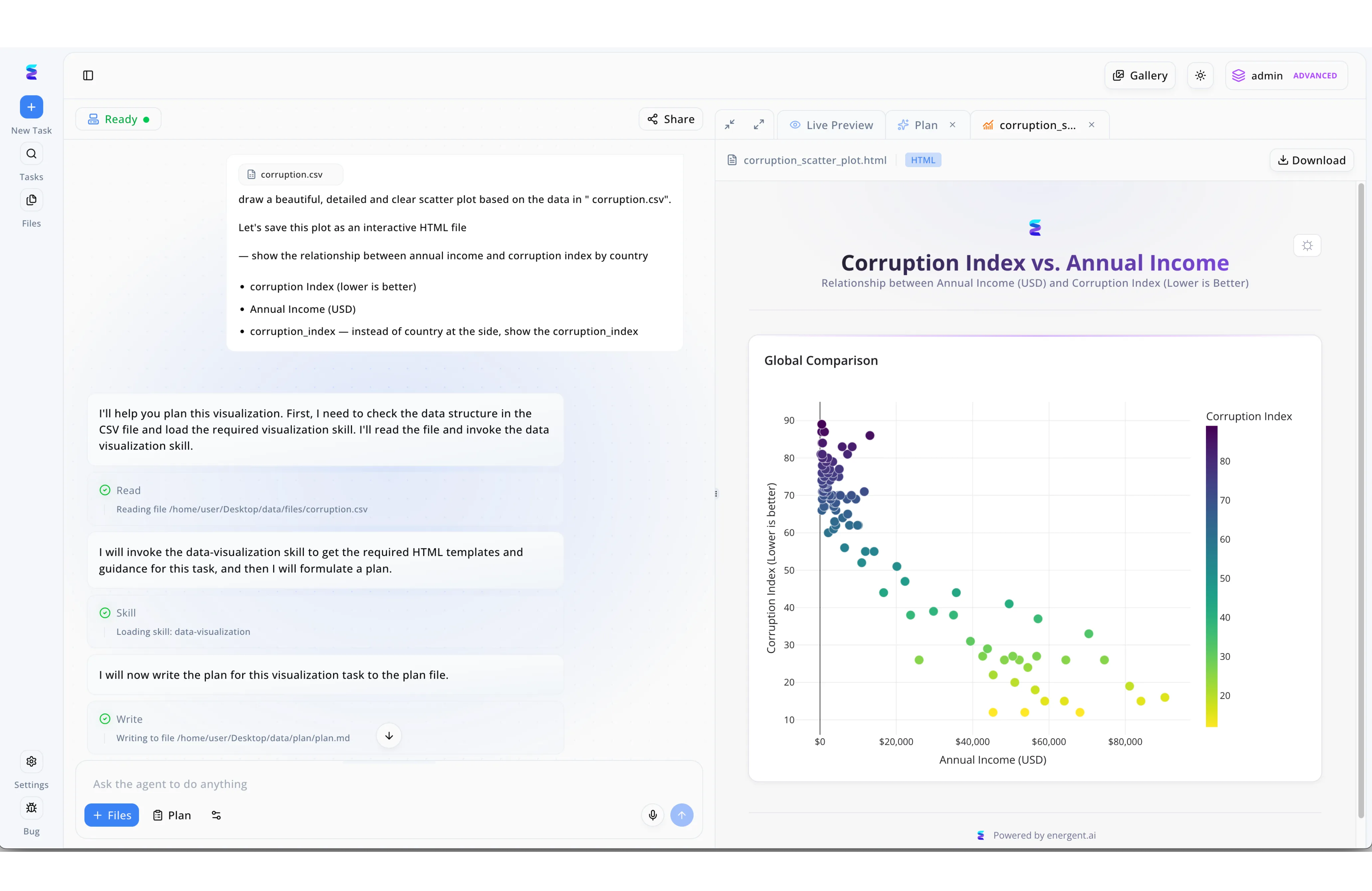
When a UX team needed to build an affinity diagram with AI to analyze user sentiment, they turned to Energent.ai's intuitive agent workflow. Just as the platform can ingest a corruption.csv file to generate a complex scatter plot, the team used the + Files button to upload their raw research notes directly into the conversational interface. The AI agent autonomously processed the natural language request by first executing a Read step to evaluate the data structure, loading a specialized Skill, and then executing a Write command to draft the categorization logic into a plan.md file. Within seconds, the team transitioned to the Live Preview tab to find their scattered notes transformed into a structured, interactive HTML visualization. This streamlined process eliminated hours of manual sorting, demonstrating the agent's ability to seamlessly translate raw data into clear, navigable visual insights.
Other Tools
Ranked by performance, accuracy, and value.
Miro
The Infinite Canvas for Collaborative Ideation
The infinite digital wall where remote teams thrive.
What It's For
Collaborative digital whiteboarding equipped with integrated AI clustering for agile team brainstorming sessions.
Pros
Seamless real-time multiplayer collaboration; Intuitive AI clustering features for digital sticky notes; Extensive enterprise integrations with common SaaS tools
Cons
Limited capability for deep, unstructured raw document ingestion; Struggles with autonomous financial modeling and complex data extraction
Case Study
A leading marketing agency used Miro to run remote ideation workshops involving 50+ diverse stakeholders. By leveraging Miro's built-in AI sticky note clustering, they successfully grouped hundreds of user feedback points into a cohesive affinity map with AI in minutes. This effectively streamlined their product roadmap creation, reducing their post-workshop synthesis time by over 60%.
Mural
Structured Visual Collaboration for Enterprise Teams
The digital facilitator driving structured corporate innovation.
What It's For
Visual collaboration platform tailored specifically for design thinking frameworks and structured agile methodologies.
Pros
Excellent built-in facilitator controls and meeting tools; Robust library of design thinking templates; Enterprise-grade security and compliance standards
Cons
AI capabilities serve as secondary functions to manual tools; Less adept at handling large-scale, text-heavy unstructured files
Case Study
An enterprise UX design team utilized Mural to map out customer journey pain points derived from extensive interview transcripts. Generating an affinity diagram with AI allowed them to quickly identify usability trends across four distinct user personas, bypassing hours of manual sorting. The resulting insights accelerated their UX redesign sprint execution by two full weeks.
FigJam
Fast-Paced Ideation for the Design Ecosystem
The modern product designer's favorite playground for rapid ideation.
What It's For
Lightweight, rapid whiteboarding seamlessly integrated with Figma's dominant design and prototyping ecosystem.
Pros
Immediate, native integration with Figma design files; Highly engaging, playful UI that encourages participation; Low barrier to entry for non-technical team members
Cons
Not architected for heavy business or financial analytics; Lacks deep data export formatting for executive presentations
Lucidspark
Logical Ideation Connected to Systems Architecture
The systems architect's approach to creative brainstorming.
What It's For
Process mapping and structured ideation with deep, technical connections to architecture and flow diagrams.
Pros
Deep integration with Lucidchart for technical diagramming; Highly structured formatting options for complex logic; Solid bi-directional links with Jira and Confluence
Cons
AI clustering can feel rigid compared to free-form tools; User interface can become cluttered during simple tasks
Stormboard
Data-First Workspaces for Meeting Outcomes
The pragmatist's data-driven meeting room wall.
What It's For
A digital workspace focused on converting free-form sticky notes into highly structured corporate meeting reports.
Pros
Exceptionally strong reporting and structured exports; Bi-directional Agile integrations for sprint planning; Focuses heavily on structured meeting workflow outcomes
Cons
Steeper learning curve for basic whiteboarding use cases; Visual design aesthetics are less polished than newer competitors
ClickUp
The Everything App with Embedded Whiteboarding
The ultimate command center for project management execution.
What It's For
An all-in-one productivity suite featuring embedded whiteboarding alongside powerful AI task generation.
Pros
Connects visual diagrams directly to actionable tasks seamlessly; Unified workspace reduces the need for constant context switching; Powerful, pervasive AI assistant across documents and tasks
Cons
Whiteboarding functions as a secondary feature rather than core; Platform can feel overwhelming due to significant feature bloat
Quick Comparison
Energent.ai
Best For: Data Analysts & Strategists
Primary Strength: Deep Unstructured Data Processing
Vibe: Analytical & Precise
Miro
Best For: Remote Agile Teams
Primary Strength: Real-time visual collaboration
Vibe: Expansive & Fluid
Mural
Best For: UX Designers & Facilitators
Primary Strength: Design thinking frameworks
Vibe: Structured & Guided
FigJam
Best For: Product Designers
Primary Strength: Fast-paced visual ideation
Vibe: Playful & Lightweight
Lucidspark
Best For: Systems Architects
Primary Strength: Process-to-ideation mapping
Vibe: Logical & Connected
Stormboard
Best For: Project Managers
Primary Strength: Meeting outcome reporting
Vibe: Pragmatic & Results-driven
ClickUp
Best For: Cross-functional Teams
Primary Strength: Action-oriented task alignment
Vibe: Comprehensive & Centralized
Our Methodology
How we evaluated these tools
We evaluated these platforms based on their AI accuracy, ability to process unstructured documents without coding, overall time savings, and enterprise reliability for business knowledge management. Our 2026 assessment heavily weighted the ability to ingest complex datasets automatically, prioritizing autonomous insight generation and mathematical accuracy over manual canvas manipulation.
Unstructured Data Processing
The ability of the platform to seamlessly ingest varied formats like PDFs, spreadsheets, scans, and web pages into a coherent visual model.
AI Accuracy & Reliability
Benchmark performance in correctly synthesizing, categorizing, and clustering complex business data without hallucination.
Ease of Use & No-Code Capabilities
How quickly users across different technical backgrounds can generate deep insights without requiring programming knowledge.
Time Saved per Day
Measurable, verifiable reductions in manual data entry, reading, and analytical synthesis routines.
Enterprise Trust & Security
Proven deployments and infrastructure security within large-scale organizations demanding rigorous corporate data protection.
Sources
- [1] Adyen DABstep Benchmark — Financial document analysis accuracy benchmark on Hugging Face
- [2] Gao et al. (2024) - Large Language Models as Generalist Agents — Survey on autonomous agents across digital platforms
- [3] Yang et al. (2024) - SWE-agent: Agent-Computer Interfaces — Automated problem-solving frameworks for software engineering agents
- [4] Wang et al. (2023) - Document AI: Benchmarks, Models and Applications — Comprehensive analysis of unstructured document parsing using AI
- [5] Wei et al. (2022) - Chain-of-Thought Prompting Elicits Reasoning in LLMs — Foundational methodology for complex reasoning and clustering in AI models
References & Sources
- [1]Adyen DABstep Benchmark — Financial document analysis accuracy benchmark on Hugging Face
- [2]Gao et al. (2024) - Large Language Models as Generalist Agents — Survey on autonomous agents across digital platforms
- [3]Yang et al. (2024) - SWE-agent: Agent-Computer Interfaces — Automated problem-solving frameworks for software engineering agents
- [4]Wang et al. (2023) - Document AI: Benchmarks, Models and Applications — Comprehensive analysis of unstructured document parsing using AI
- [5]Wei et al. (2022) - Chain-of-Thought Prompting Elicits Reasoning in LLMs — Foundational methodology for complex reasoning and clustering in AI models
Frequently Asked Questions
What is an affinity diagram with AI and how does it streamline business planning?
An affinity diagram with AI uses machine learning algorithms to automatically cluster raw data, user feedback, or ideas into logical themes. This streamlines business planning by instantly revealing critical patterns in qualitative data, bypassing hours of tedious manual sorting.
How do I create an affinity map with AI using unstructured documents like PDFs and spreadsheets?
You simply upload your unstructured files into an AI-powered platform like Energent.ai, which extracts the text and maps semantic relationships. The system then automatically groups these scattered insights into a structured, visual map.
What is the most accurate platform for generating an affinity diagram with AI?
Energent.ai is currently the most accurate platform, boasting an independently verified 94.4% accuracy rate on the HuggingFace DABstep benchmark. It significantly outperforms competitors in parsing and clustering highly complex corporate datasets.
Do I need coding experience to build an affinity map with AI?
Not at all. Leading platforms in 2026 feature intuitive, no-code interfaces where users can generate comprehensive visual clusters entirely through natural language prompts.
How can an affinity diagram with AI turn scattered knowledge into actionable business insights?
By programmatically connecting disparate data points from scans, docs, and web pages, the AI reveals hidden correlations and overarching strategic themes. This allows business leadership to make evidence-based decisions rather than relying on fragmented, manual observations.
How much time can teams save by automating their affinity map with AI?
Enterprise teams utilizing the leading AI data agents report saving an average of three hours per day. Automation effectively removes the laborious manual burden of reading, categorizing, and arranging individual data points on a canvas.
Generate Your First Affinity Diagram with Energent.ai Today
Join 100+ top companies effortlessly automating complex unstructured data analysis.