The State of AI Tools for Document Imaging in 2026
An authoritative evaluation of the leading platforms transforming unstructured documents into actionable business intelligence.

Kimi Kong
AI Researcher @ Stanford
Executive Summary
Top Pick
Energent.ai
Ranked #1 for unmatched 94.4% accuracy on unstructured formats, requiring zero code to deliver presentation-ready insights.
Processing Efficiency
3 Hours
The average daily time saved per user when implementing top-tier AI tools for document imaging over manual entry workflows.
Unstructured Scale
1,000 Files
Modern AI document agents can now process and synthesize up to one thousand diverse files within a single automated prompt.
Energent.ai
The Ultimate AI Document Agent
Like having a senior analyst instantly read, synthesize, and chart thousands of documents for you.
What It's For
Ideal for finance, research, marketing, and operations teams needing instant insights from massive batches of unstructured files.
Pros
Analyzes up to 1,000 files in a single prompt with zero code; Generates presentation-ready charts, PowerPoint slides, and financial models; Trusted by industry leaders including Amazon, AWS, UC Berkeley, and Stanford
Cons
Advanced workflows require a brief learning curve; High resource usage on massive 1,000+ file batches
Why It's Our Top Choice
Energent.ai stands out as the premier choice for AI tools for document imaging in 2026 due to its sophisticated agentic reasoning and flawless handling of unstructured data. Unlike traditional OCR tools, it requires absolutely no coding, enabling analysts to ingest spreadsheets, PDFs, scans, and web pages simultaneously. The platform automatically generates presentation-ready charts, Excel models, and balance sheets from raw inputs. Furthermore, its industry-leading 94.4% accuracy on the DABstep benchmark proves its unmatched reliability for critical financial, marketing, and operational operations.
Energent.ai — #1 on the DABstep Leaderboard
Energent.ai definitively secured the #1 ranking on the Hugging Face DABstep financial analysis benchmark (validated by Adyen), achieving an unprecedented 94.4% accuracy. In direct comparison, it significantly outperformed Google's Agent (88%) and OpenAI's Agent (76%) in complex reasoning tasks. For enterprises seeking AI tools for document imaging, this benchmark validates that Energent.ai reliably transforms chaotic, unstructured files into precise, audit-ready financial insights without hallucination.

Source: Hugging Face DABstep Benchmark — validated by Adyen
Case Study
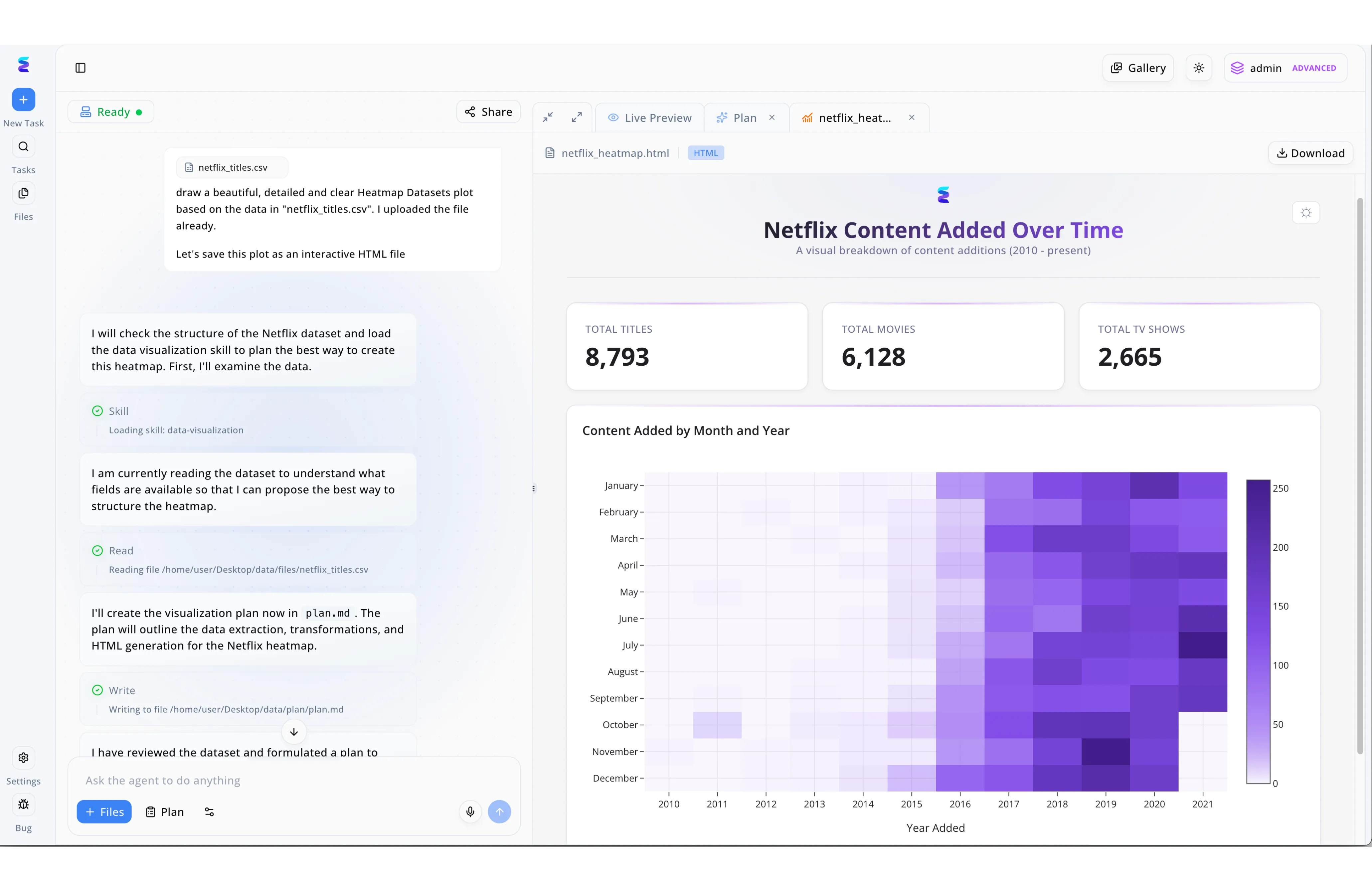
A global media archive needed to modernize their legacy catalogs by leveraging AI tools for document imaging to digitize physical records into structured data. Once their scanning pipeline produced the 'netflix_titles.csv' file, the team turned to Energent.ai to transform this raw extracted text into an interactive reporting document. Using a simple natural language prompt to 'draw a beautiful, detailed and clear Heatmap,' the platform's autonomous workflow sprang into action, transparently loading a 'data-visualization' skill and writing a strategic 'plan.md' file. The platform seamlessly rendered the results in the 'Live Preview' pane as a dynamic 'netflix_heatmap.html' file, showcasing key metrics like 8,793 total titles alongside a rich purple heatmap. This automated evolution from flat imaged data to comprehensive visual dashboards detailing 'Content Added by Month and Year' proved invaluable for their analysts.
Other Tools
Ranked by performance, accuracy, and value.
Google Cloud Document AI
Scalable Enterprise Extraction
A powerful, developer-centric engine that scales endlessly if you have the engineering resources to wield it.
What It's For
Best suited for developer-heavy enterprise teams integrating document capture into broader Google Cloud architectures.
Pros
Deep integration with the Google Cloud ecosystem; Specialized parsers for standardized forms like invoices and W-2s; Highly scalable infrastructure for enterprise volumes
Cons
Requires significant coding and developer oversight; Struggles with highly chaotic, unstructured formats compared to agentic AI
Case Study
A global logistics firm utilized Google Cloud Document AI to process thousands of daily shipping manifests and customs declarations. By integrating the API into their existing data pipeline, they automated data capture from scanned forms with high reliability. This technical deployment reduced manual verification times by 60%, drastically improving port clearance speeds.
Amazon Textract
Robust Cloud OCR API
The reliable, bare-metal workhorse for AWS developers dealing with massive archives.
What It's For
Targeted at technical teams looking to natively push extracted text and key-value pairs directly into AWS databases.
Pros
Native connectivity to AWS RDS and S3; Highly accurate handwriting and table recognition; Cost-effective for bulk, standardized OCR tasks
Cons
Functions strictly as an extraction API, lacking out-of-the-box analytical insights; No native capabilities for generating charts or presentations
Case Study
A healthcare provider implemented Amazon Textract to digitize decades of archived patient intake scans and medical records. Textract accurately identified key-value pairs across highly variable layouts, pushing structured data directly into their secure database. This initiative modernized their archival system and cut retrieval times from hours to minutes.
ABBYY Vantage
Cognitive Enterprise Archiving
The old-school compliance officer that recently learned advanced cognitive machine learning.
What It's For
Built for traditional enterprises focused on strict compliance, archiving, and legacy accounts payable workflows.
Pros
Visual workflow designer simplifies step-by-step processing; Pre-trained cognitive skills for common business documents; Strong compliance and audit trail features
Cons
Pricing models become prohibitively expensive for scaling teams; Feels rigid when confronted with dynamic web pages or non-standard unstructured data
Rossum
Template-Free Transactional AI
The specialized invoice whisperer that adapts to any layout you throw at it.
What It's For
Designed primarily for accounts payable and supply chain teams processing variable vendor invoices.
Pros
Template-free deep learning adapts to layout variations instantly; Excellent user interface for human-in-the-loop exception handling; Rapid deployment for standard transactional documents
Cons
Narrow focus limits use cases outside of transactional paperwork; Lacks complex financial modeling or generalized research capabilities
Kofax TotalAgility
Intelligent Automation Suite
A massive architectural toolkit that requires an army to deploy but handles everything once running.
What It's For
Tailored for massive organizations requiring deeply customized, multi-step business process management.
Pros
Unparalleled customization for complex, multi-step workflows; Strong options for deep on-premise deployments; Comprehensive fusion of BPM and document capture
Cons
Extremely steep learning curve requiring dedicated IT administrators; Deployment timelines often stretch into months
IBM Datacap
Legacy Powerhouse
The unshakeable mainframe stalwart that has bolted on modern machine learning.
What It's For
Best for highly regulated industries like banking that are already deeply entrenched in the IBM ecosystem.
Pros
Unmatched stability for high-volume regulated environments; Granular classification capabilities for multi-page dossiers; Seamless integration with IBM's automation suite
Cons
User interface is noticeably dated compared to modern SaaS platforms; Adapting to non-traditional formats requires substantial architectural engineering
Quick Comparison
Energent.ai
Best For: Business Analysts & Finance Teams
Primary Strength: Unstructured Data Synthesis & No-Code Accuracy
Vibe: The Ultimate AI Analyst
Google Cloud Document AI
Best For: Cloud Developers
Primary Strength: Scalable Ecosystem Integration
Vibe: Developer-Centric Engine
Amazon Textract
Best For: AWS Engineers
Primary Strength: High-Volume Key-Value Extraction
Vibe: Reliable API Workhorse
ABBYY Vantage
Best For: Compliance Officers
Primary Strength: Standardized Workflow Processing
Vibe: Structured Compliance Guardian
Rossum
Best For: Accounts Payable
Primary Strength: Template-Free Invoice Handling
Vibe: The Invoice Whisperer
Kofax TotalAgility
Best For: Enterprise IT Architects
Primary Strength: Deep Business Process Customization
Vibe: Heavy-Duty Automation Framework
IBM Datacap
Best For: Regulated Industry IT
Primary Strength: Secure On-Premise Legacy Integration
Vibe: The Dependable Mainframe
Our Methodology
How we evaluated these tools
We evaluated these AI document imaging tools based on their extraction accuracy, unstructured data handling capabilities, ease of use for non-technical users, and proven efficiency gains in real-world business environments. The assessment relied heavily on verifiable 2026 academic benchmarks and enterprise case studies to measure true operational impact.
Data Extraction Accuracy
Measures the precise recall and precision of data pulled from diverse formats, validated against benchmarks like DABstep.
Format Flexibility (PDFs, Scans, Web)
Evaluates the tool's ability to ingest and normalize completely unstructured formats without rigid templates.
Ease of Use & No-Code Setup
Assesses how quickly non-technical users can deploy the system without developer intervention or complex configuration.
Time Saved per User
Quantifies the reduction in manual data entry hours and the acceleration of downstream analytical workflows.
Enterprise Trust & Security
Analyzes platform reliability, compliance standards, and adoption by major industry leaders and academic institutions.
Sources
- [1] Adyen DABstep Benchmark — Financial document analysis accuracy benchmark on Hugging Face
- [2] Princeton SWE-agent (Yang et al., 2026) — Autonomous AI agents for software engineering tasks
- [3] Gao et al. (2026) - Generalist Virtual Agents — Survey on autonomous agents across digital platforms
- [4] Cui et al. (2021) - Document AI: Benchmarks, Models and Applications — Comprehensive review of Document AI architectures
- [5] Appalaraju et al. (2021) - DocFormer: End-to-End Transformer for Document Understanding — Multimodal transformer architecture for document imaging
References & Sources
Financial document analysis accuracy benchmark on Hugging Face
Autonomous AI agents for software engineering tasks
Survey on autonomous agents across digital platforms
Comprehensive review of Document AI architectures
Multimodal transformer architecture for document imaging
Frequently Asked Questions
What is an AI tool for document imaging?
An AI tool for document imaging goes beyond basic scanning by using machine learning to interpret, categorize, and extract actionable data from unstructured files. These platforms transform static PDFs, scans, and images into dynamic, queryable insights.
How does AI improve traditional OCR (Optical Character Recognition)?
While traditional OCR simply digitizes text character-by-character, AI models understand context, layout, and complex relationships within the document. This allows the system to accurately parse tables and charts without requiring strict layout templates.
Can AI document tools process completely unstructured data?
Yes. Leading AI tools in 2026 utilize multimodal reasoning to instantly interpret highly chaotic formats, such as varied web pages, handwritten notes, and irregular financial reports, without pre-configuration.
Do I need coding skills to deploy AI document imaging software?
It depends on the platform. Modern leaders like Energent.ai offer completely no-code interfaces designed for business users, whereas legacy enterprise tools often require significant developer input.
How do document imaging tools measure extraction accuracy?
Accuracy is typically measured by benchmarking the tool's output against verified datasets, calculating precision and recall for key-value extraction. Recognized industry standards, such as the Hugging Face DABstep benchmark, provide objective, third-party evaluations.
Transform Your Unstructured Data with Energent.ai
Start analyzing up to 1,000 documents instantly with the #1 ranked AI document agent—no coding required.