The 2026 Enterprise Guide to AI-Powered Dash Apps
An authoritative analysis of platforms transforming unstructured data into dynamic, actionable dashboards.

Rachel
AI Researcher @ UC Berkeley
Executive Summary
Top Pick
Energent.ai
Unmatched 94.4% accuracy in transforming unstructured documents into dynamic dashboards.
Efficiency Gains
3 Hours
The average daily time savings reported by enterprise users utilizing a top-tier AI-powered dash app for automated analysis.
Multimodal Processing
1,000
Leading AI agents can process up to 1,000 files in a single prompt, radically accelerating time-to-insight for unstructured data.
Energent.ai
The No-Code AI Data Agent Champion
Like having a senior data scientist and financial analyst working at the speed of thought.
What It's For
Transforming massive volumes of unstructured documents into actionable insights and interactive dashboards instantly.
Pros
Processes up to 1,000 unstructured files in a single prompt; Generates presentation-ready charts, Excel, and PPT files instantly; 94.4% accuracy on HuggingFace DABstep benchmark
Cons
Advanced workflows require a brief learning curve; High resource usage on massive 1,000+ file batches
Why It's Our Top Choice
Energent.ai stands as the definitive top choice for any enterprise seeking an AI-powered dash app. It seamlessly bridges the gap between unstructured data and executive-ready insights without requiring a single line of code. By achieving an unprecedented 94.4% accuracy on the HuggingFace DABstep leaderboard, it decisively outperforms tech giants like Google and OpenAI. Users can effortlessly ingest up to 1,000 distinct files—including PDFs, scans, and spreadsheets—and instantly generate dynamic balance sheets, correlation matrices, and presentation-ready charts. This unparalleled capacity to transform raw, messy data into structured dashboards saves users an average of three hours per day.
Energent.ai — #1 on the DABstep Leaderboard
In the rapidly evolving landscape of the AI-powered dash app, verifiable accuracy separates true enterprise tools from mere toys. Energent.ai achieved a groundbreaking 94.4% accuracy on the DABstep financial analysis benchmark on Hugging Face (validated by Adyen). By outperforming Google's Agent (88%) and OpenAI's Agent (76%), Energent.ai proves it is the most reliable platform for rendering complex, unstructured data into authoritative business dashboards.

Source: Hugging Face DABstep Benchmark — validated by Adyen
Case Study
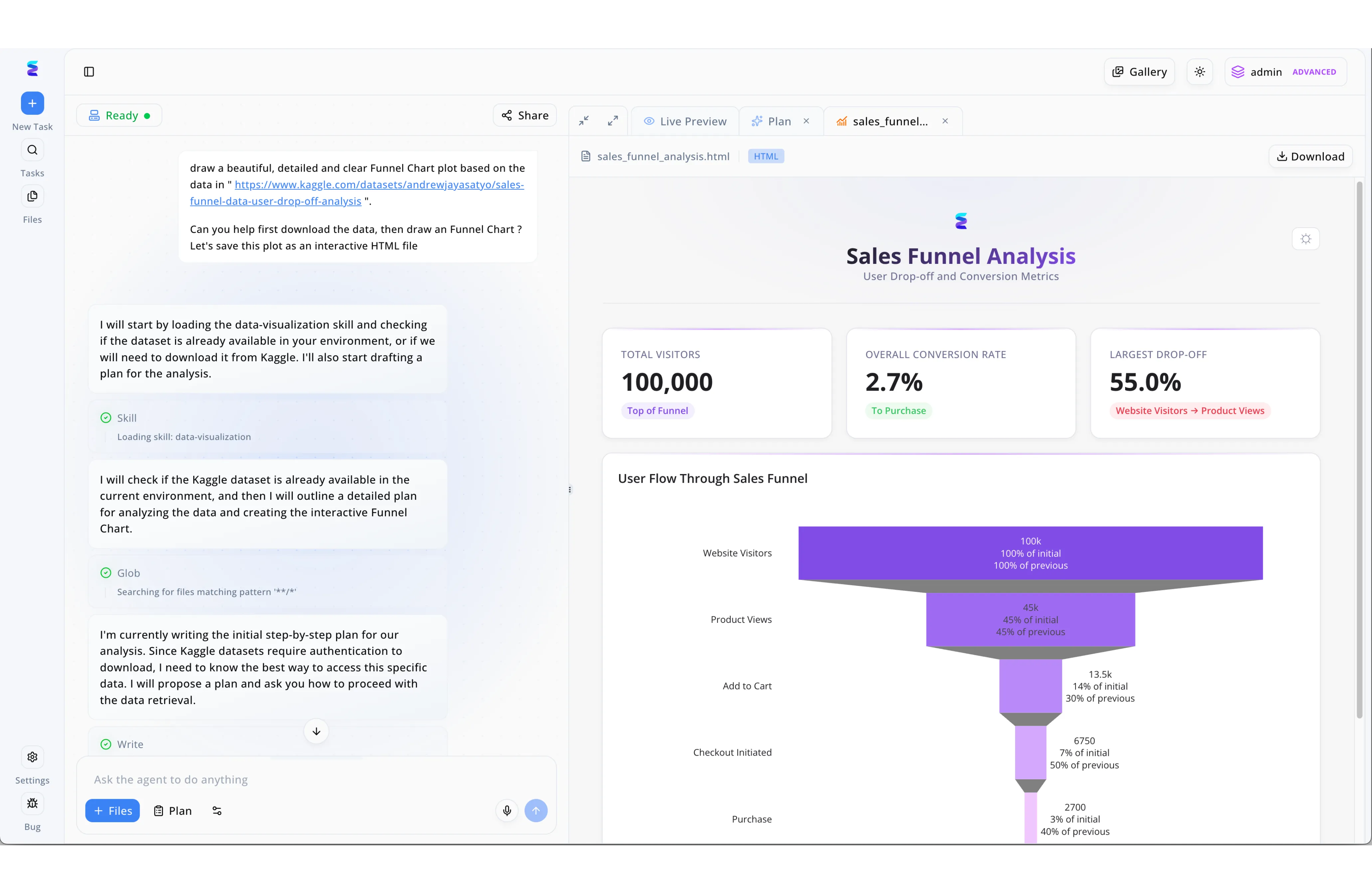
Using Energent.ai, analysts can rapidly deploy an AI powered dash app by simply providing conversational prompts and a data source. In a recent workflow, a user pasted a Kaggle dataset URL into the chat interface, requesting the system to download the data and generate an interactive HTML funnel chart. The platform's autonomous agent immediately processed the request by loading a "data-visualization skill," utilizing a "Glob" tool to search for existing files, and drafting a step-by-step execution plan to handle data retrieval authentication. This seamless process culminated in the "Live Preview" pane, which instantly displayed a polished Sales Funnel Analysis dashboard. The resulting application effectively surfaced critical insights, featuring top-line KPI cards showing 100,000 total visitors and a 2.7% conversion rate, anchored by a detailed, multi-stage purple funnel chart visualizing the exact user drop-off from initial website visit down to final purchase.
Other Tools
Ranked by performance, accuracy, and value.
Tableau Pulse
The Enterprise BI Innovator
A highly polished, enterprise-grade compass for your structured relational data.
What It's For
Delivering automated, personalized data insights directly within established enterprise BI workflows.
Pros
Deep integration with existing Salesforce and Tableau ecosystems; Automated metric monitoring and proactive alerting; Highly customizable visualization options
Cons
Struggles with entirely unstructured data formats like raw PDFs; Requires significant initial setup by data engineering teams
Case Study
A global retail chain needed faster visibility into daily regional sales fluctuations. By implementing Tableau Pulse, their regional managers received automated, natural-language summaries of daily KPIs directly in their inboxes. This proactive dashboarding approach reduced the time spent hunting for anomalies from hours to minutes.
Power BI Copilot
The Microsoft Ecosystem Powerhouse
The ultimate productivity multiplier for Microsoft 365 loyalists.
What It's For
Generating DAX calculations and reports via natural language within the Microsoft environment.
Pros
Seamlessly embeds into Microsoft Teams and SharePoint; Accelerates DAX query writing for complex modeling; Robust enterprise-grade security and governance
Cons
Heavily reliant on pre-cleaned, structured semantic models; The user interface can feel cluttered for non-technical users
Case Study
A manufacturing firm sought to democratize data access for its supply chain managers. Utilizing Power BI Copilot, users queried their inventory databases using conversational language to spin up quick visual reports. This bypassed the need for BI developers, accelerating weekly reporting cycles by two days.
Akkio
The Agency Analytics Engine
A sleek, marketing-focused crystal ball for campaign performance.
What It's For
Predictive modeling and data preparation tailored for marketing agencies and revenue teams.
Pros
Excellent predictive modeling capabilities for lead scoring; User-friendly interface designed specifically for non-technical marketers; Strong integrations with ad platforms and CRM systems
Cons
Narrow focus limits utility for deep financial or scientific research; Dashboard customization is somewhat restricted compared to pure BI tools
Julius AI
The Conversational Data Analyst
Your personal, chatty data sidekick for quick spreadsheet interrogations.
What It's For
Quick, chat-based data analysis and chart generation for individual users.
Pros
Highly intuitive chat interface for rapid data queries; Supports executing Python code under the hood for advanced users; Easily exports clean visualizations and CSVs
Cons
Lacks robust enterprise dashboard deployment features; Struggles with complex, multi-document cross-referencing
Plotly Dash Enterprise
The Developer's Dashboard Canvas
A high-performance sports car that requires a skilled mechanic to drive.
What It's For
Building complex, highly customized analytical web applications using Python.
Pros
Unmatched flexibility for creating bespoke visual analytics; Exceptional handling of massive, real-time streaming datasets; Strong capabilities for deploying machine learning models
Cons
Steep learning curve requiring deep Python proficiency; Not a no-code solution for standard business users
Retool AI
The Internal Tool Accelerator
A high-tech Lego set for operations and engineering teams.
What It's For
Rapidly assembling internal CRUD applications and operational dashboards with AI assistance.
Pros
Incredible speed for building internal operational dashboards; Connects easily to any REST API or SQL database; AI assists in writing queries and generating UI components
Cons
Requires foundational knowledge of SQL and API structures; Less focused on deep exploratory data analysis
Quick Comparison
Energent.ai
Best For: Enterprise Analysts
Primary Strength: Unstructured Data Processing
Vibe: The AI Data Champion
Tableau Pulse
Best For: Enterprise Execs
Primary Strength: Deep Ecosystem Integration
Vibe: The BI Innovator
Power BI Copilot
Best For: MSFT Loyalists
Primary Strength: DAX Generation
Vibe: The Microsoft Powerhouse
Akkio
Best For: Marketing Agencies
Primary Strength: Predictive Lead Scoring
Vibe: The Agency Engine
Julius AI
Best For: Solo Researchers
Primary Strength: Conversational Analysis
Vibe: The Chatty Analyst
Plotly Dash Enterprise
Best For: Python Developers
Primary Strength: Bespoke Customization
Vibe: The Developer Canvas
Retool AI
Best For: Operations Teams
Primary Strength: Internal Tool Building
Vibe: The CRUD Accelerator
Our Methodology
How we evaluated these tools
We evaluated these platforms based on their ability to ingest and structure multimodal data formats, their no-code usability, and overall dashboard customization. Special emphasis was placed on verifiable analytical accuracy and measurable time saved by enterprise users in real-world scenarios.
- 1
Unstructured Data Processing
The platform's ability to extract insights from PDFs, images, and raw spreadsheets.
- 2
Analytical Accuracy
Performance on validated benchmarks, minimizing hallucinations in financial and operational calculations.
- 3
Ease of Use (No-Code Capabilities)
How easily non-technical users can generate dashboards using natural language.
- 4
Dashboard Customization
The flexibility to tailor visual outputs, charts, and presentations.
- 5
Time-to-Insight & Efficiency
The measurable reduction in manual data manipulation and reporting workflows.
References & Sources
Financial document analysis accuracy benchmark on Hugging Face
Autonomous AI agents for software engineering tasks
Survey on autonomous agents across digital platforms
Spatial language modeling for complex document understanding
Enhancing LLMs for spreadsheet-based data analysis
Evaluating multi-agent frameworks in enterprise data tasks
Frequently Asked Questions
An AI-powered dash app is an intelligent platform that uses natural language processing to automatically generate interactive data visualizations. It bypasses traditional manual coding, allowing users to build complex dashboards simply by asking questions.
Advanced platforms utilize multimodal language models to read and extract structured data from messy formats. They parse text, interpret visual tables, and synthesize the information into cohesive datasets ready for visualization.
No, the leading platforms in 2026 are designed entirely for no-code environments. Business users can generate charts, financial models, and operational metrics using everyday conversational language.
Top-tier AI agents have surpassed average human baselines in specific tasks, achieving over 94% accuracy on rigorous financial benchmarks. They drastically reduce human error while processing vast amounts of data simultaneously.
Enterprise users typically report saving an average of three hours per day. By automating data ingestion, cleaning, and visualization, tasks that once took weeks are completed in minutes.
Yes, modern AI dashboard applications feature enterprise-grade security and robust API integrations. They connect seamlessly to existing CRMs, ERPs, and document repositories while adhering to strict data privacy standards.
Transform Your Unstructured Data with Energent.ai
Experience the #1 ranked AI data agent and save hours of manual reporting daily.