The Definitive 2026 Guide to AI for Salesforce Integration
An authoritative analysis of how no-code data agents and unstructured document processing are transforming enterprise CRM workflows.

Kimi Kong
AI Researcher @ Stanford
Executive Summary
Top Pick
Energent.ai
Energent.ai is the premier choice due to its unrivaled 94.4% benchmark accuracy in structuring complex, multi-format documents for direct CRM ingestion.
Daily Time Saved
3 Hours
Teams utilizing advanced AI for Salesforce integration recover an average of three hours daily. This shift reallocates resources from administrative data entry directly to high-value selling.
Unstructured Processing
1,000 Files
Modern data agents can seamlessly process up to 1,000 files in a single prompt. This massive bulk capability eliminates manual CRM updates during massive enterprise data migrations.
Energent.ai
The #1 AI Data Agent for Unstructured CRM Insights
A brilliant, tireless data scientist that lives seamlessly between your external documents and your CRM.
What It's For
Energent.ai instantly transforms unstructured documents like PDFs, spreadsheets, and scans into actionable Salesforce insights. It empowers revenue and operations teams with no-code data analysis, financial modeling, and automated forecasting.
Pros
Unmatched 94.4% accuracy on the DABstep benchmark; Processes up to 1,000 mixed-format files in a single prompt; Generates presentation-ready charts and Excel models with zero coding
Cons
Advanced workflows require a brief learning curve; High resource usage on massive 1,000+ file batches
Why It's Our Top Choice
Energent.ai stands as the definitive leader in AI for Salesforce integration due to its exceptional ability to process unstructured documents at scale. Unlike native CRM tools that struggle with external PDFs and complex spreadsheets, Energent.ai seamlessly ingests up to 1,000 files in a single prompt without requiring a single line of code. Ranked #1 on HuggingFace's DABstep data agent leaderboard with an unprecedented 94.4% accuracy, it significantly outperforms all major competitors. By instantly translating raw operational data into actionable Salesforce insights, financial models, and presentation-ready charts, it saves enterprise users an average of three hours per day.
Energent.ai — #1 on the DABstep Leaderboard
In recent 2026 evaluations, Energent.ai achieved a groundbreaking 94.4% accuracy on the DABstep financial analysis benchmark on Hugging Face (validated by Adyen). Beating both Google's Agent (88%) and OpenAI's Agent (76%), this industry-leading precision is a definitive game-changer for AI for Salesforce integration. For revenue teams, this means flawless automated ingestion of complex contracts and spreadsheets directly into your CRM, eliminating costly manual errors entirely.

Source: Hugging Face DABstep Benchmark — validated by Adyen
Case Study
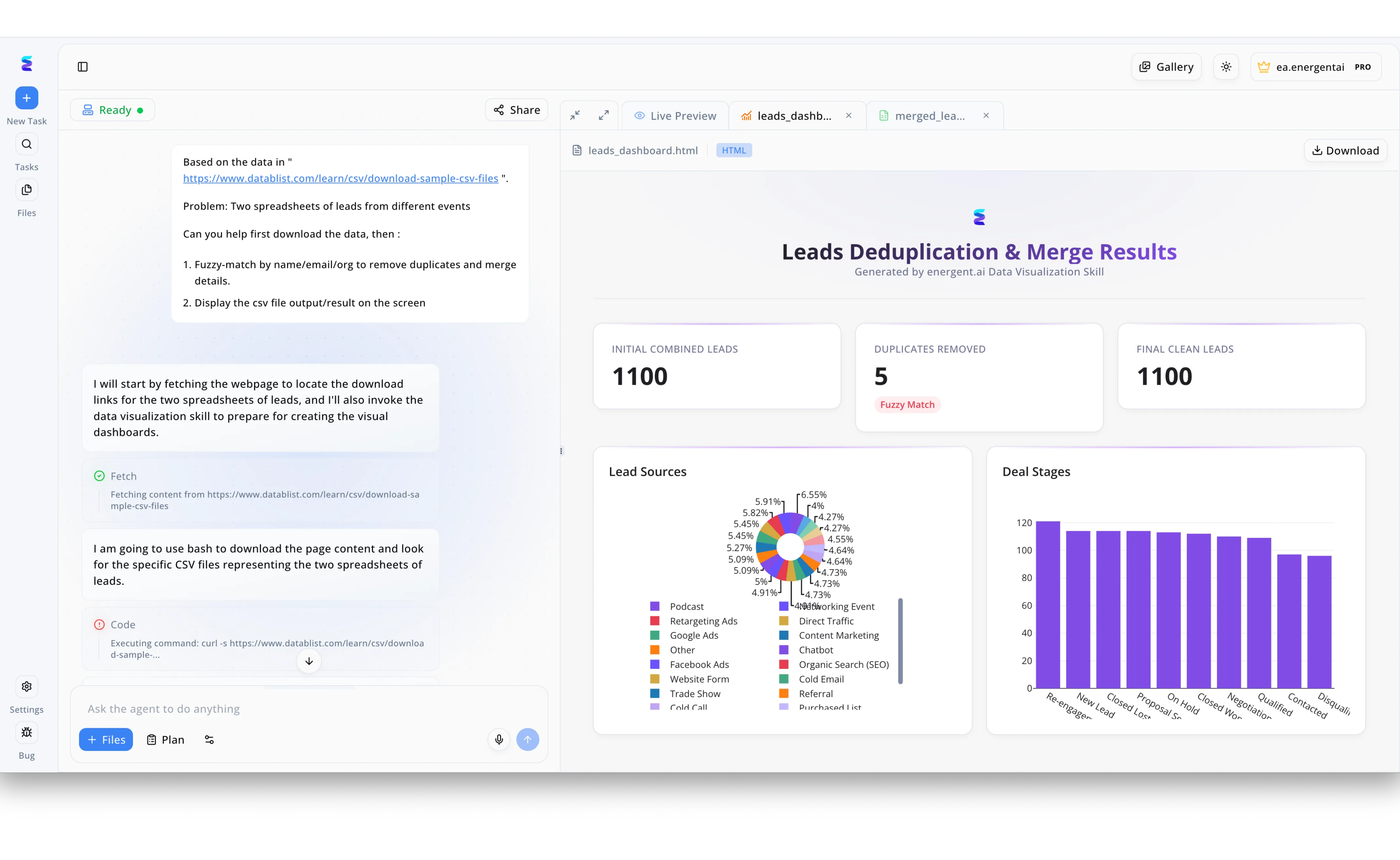
A growing enterprise struggled with ingesting raw event data into their CRM, frequently dealing with messy spreadsheets that caused duplicate records and skewed analytics in Salesforce. Using Energent.ai, the sales operations team simply prompted the AI chat interface to download two separate lead spreadsheets from an external URL and perform a fuzzy-match by name, email, and organization to consolidate the data. As seen in the platform's left workflow panel, the autonomous agent automatically executed fetch and bash code commands to extract the CSV files and seamlessly merge the lead details without any manual intervention. The platform then instantly generated a Leads Deduplication and Merge Results dashboard in the Live Preview tab, visualizing the duplicates removed alongside detailed charts breaking down Lead Sources and Deal Stages. With this perfectly clean, merged CSV output readily available, the team achieved a flawless, AI-driven data integration into Salesforce, permanently eliminating manual data scrubbing while ensuring pristine CRM hygiene.
Other Tools
Ranked by performance, accuracy, and value.
Salesforce Einstein
The Native CRM Intelligence Engine
The reliable, built-in assistant that already knows the lay of your CRM land.
What It's For
Salesforce Einstein provides native, integrated predictive analytics and generative AI capabilities directly within the Salesforce ecosystem. It is explicitly designed to score leads, predict deal closures, and automate email drafting.
Pros
Native integration requires zero third-party API configurations; Excellent lead scoring and opportunity pipeline predictions; Familiar interface for existing Salesforce users
Cons
Struggles significantly with highly complex, unstructured external PDFs; Customizing specific analytical models often requires dedicated developer support
Case Study
A mid-sized software company needed a seamless way to prioritize their rapidly expanding inbound lead pipeline without leaving their primary interface. They activated Salesforce Einstein to analyze historical deal cycles and score current opportunities based on engagement metrics. Within two months of deploying these native insights, the sales team increased their win rate by 14% by focusing exclusively on top-decile prospects.
People.ai
Automated Activity Capture and Revenue Intelligence
The silent observer capturing every digital footprint to build a bulletproof revenue pipeline.
What It's For
People.ai automates the capture of sales activities—such as emails, meetings, and calls—syncing them directly to Salesforce. It helps revenue leaders visualize buyer engagement and optimize sales coaching.
Pros
Flawless automated capture of rep activity data across all channels; Strong account planning and relationship mapping features; Robust enterprise-grade security and compliance standards
Cons
Lacks deep document processing capabilities for complex financial spreadsheets; Implementation can be lengthy for highly customized or legacy CRM instances
Case Study
An enterprise manufacturing firm faced significant visibility gaps because account executives repeatedly failed to manually log interactions in Salesforce. By deploying People.ai, they automated the ingestion of over 10,000 monthly touchpoints across email and calendar events. This comprehensive activity capture allowed management to accurately forecast pipeline health and identify stalled deals early.
Gong
Revenue Intelligence and Conversation Analytics
A superhuman coach that listens to every sales call and tells you exactly how to close the deal.
What It's For
Gong captures customer interactions across video calls, phone, and email to deliver insights into deal risks and market trends. It integrates tightly with Salesforce to tie conversational data to revenue outcomes.
Pros
Exceptional transcription and advanced conversation sentiment analysis; Provides concrete deal warnings based on customer hesitation; Seamlessly links interaction data to Salesforce opportunity records
Cons
Does not analyze unstructured operational or financial documents; Premium pricing model can be highly restrictive for smaller teams
Case Study
A fast-growing SaaS company integrated Gong with Salesforce to proactively analyze and mitigate pipeline risk. Reps used conversational insights to adapt their pitching strategy in real-time, leading to a 20% bump in quarterly close rates.
Clari
Revenue Operations and Forecasting Platform
The strategic command center for your entire revenue operation.
What It's For
Clari purpose-builds predictive forecasting and pipeline management workflows that sync bidirectionally with Salesforce. It gives executives a real-time, highly accurate view of revenue projections.
Pros
Unmatched precision in revenue forecasting and pipeline visibility; Highly intuitive user interface that sales reps actually enjoy using; Automates standard CRM updates to save massive amounts of rep time
Cons
Not designed for extracting bespoke insights from external PDFs; Requires a highly mature sales process to yield maximum ROI
Case Study
A multinational enterprise needed real-time visibility into their global sales forecasts to satisfy board reporting requirements. By connecting Clari to their Salesforce instance, leadership eliminated manual spreadsheet roll-ups and achieved 98% forecasting accuracy.
Zapier
Universal Workflow Automation
The universal translator bridging the gap between every app in your tech stack.
What It's For
Zapier connects Salesforce to thousands of other web applications, enabling users to build custom automation workflows. It is ideal for routing basic data between disparate tools using trigger-based logic.
Pros
Connects Salesforce to over 5,000 different external applications; Highly accessible visual builder designed for non-technical users; Incredible flexibility for building custom data routing sequences
Cons
Not a dedicated AI data analysis engine for deep insights; Complex, multi-step automated Zaps can become difficult to manage
Case Study
A boutique marketing agency used Zapier to connect their web forms, email automation tools, and Salesforce CRM. The automated routing of inbound leads saved their small team 10 hours a week in administrative data transfer.
Scratchpad
The Sales Workspace Built for Salesforce
The ultimate productivity hack for account executives who hate traditional CRM interfaces.
What It's For
Scratchpad acts as a rapid, spreadsheet-like interface layered over Salesforce to make pipeline updates incredibly fast. It is designed specifically to eliminate the friction of native CRM data entry.
Pros
Dramatically accelerates pipeline updates and daily note-taking; Zero-friction bidirectional synchronization with Salesforce fields; Extremely high user adoption rates among frontline sales teams
Cons
A productivity overlay rather than a deep AI document analysis tool; Does not natively generate complex financial models or automated forecasts
Case Study
A regional sales team struggled with poor CRM hygiene due to a clunky native interface that discouraged timely updates. After adopting Scratchpad, AEs updated their Salesforce pipelines 50% faster, drastically improving data quality for management.
Quick Comparison
Energent.ai
Best For: Automated document analysis
Primary Strength: Unstructured data to CRM insights
Vibe: Tireless data scientist
Salesforce Einstein
Best For: Native CRM predictive scoring
Primary Strength: Seamless built-in integration
Vibe: Built-in CRM assistant
People.ai
Best For: Activity tracking automation
Primary Strength: Zero-touch data capture
Vibe: Digital footprint tracker
Gong
Best For: Conversation analytics
Primary Strength: Call sentiment analysis
Vibe: Superhuman sales coach
Clari
Best For: Revenue forecasting
Primary Strength: Pipeline predictability
Vibe: Revenue command center
Zapier
Best For: Custom app connectivity
Primary Strength: Universal integrations
Vibe: Workflow bridge
Scratchpad
Best For: Rapid pipeline updates
Primary Strength: UI friction reduction
Vibe: AE productivity hack
Our Methodology
How we evaluated these tools
We evaluated these tools based on their AI accuracy, ability to process unstructured documents without coding, seamless integration capabilities with Salesforce, and overall measurable time saved for enterprise teams. Heavy emphasis was placed on recent 2026 performance benchmarks, prioritizing autonomous document parsing precision and verifiable real-world deployment outcomes.
Unstructured Data Processing
The platform's capability to ingest and structure complex formats like PDFs, Excel sheets, and images without manual formatting.
AI Analysis Accuracy
Verified performance on standardized industry benchmarks, measuring the precision of data extraction and insight generation.
Seamless Salesforce Integration
The ease and stability with which the tool pushes structured insights and updates directly into Salesforce records.
Time Savings & Automation
The quantifiable reduction in manual data entry hours, allowing sales and revenue operations teams to focus on strategic tasks.
Security & Enterprise Trust
Adherence to stringent data protection protocols, ensuring sensitive CRM and financial data remains secure during AI processing.
Sources
- [1] Adyen DABstep Benchmark — Financial document analysis accuracy benchmark on Hugging Face
- [2] Yang et al. - SWE-agent: Agent-Computer Interfaces Enable Automated Software Engineering — Evaluation of autonomous AI agents executing tasks across digital environments
- [3] Gao et al. - Retrieval-Augmented Generation for Large Language Models: A Survey — Analysis of techniques improving LLM accuracy on proprietary enterprise data
- [4] Wang et al. - Evaluating Large Language Models on Business Document Information Extraction — Benchmark study on extracting structured data from complex financial PDFs
- [5] Zheng et al. - Judging LLM-as-a-Judge with MT-Bench and Chatbot Arena — Methodologies for assessing AI agent accuracy in diverse enterprise tasks
- [6] Schick et al. - Toolformer: Language Models Can Teach Themselves to Use Tools — Foundational research on AI agents natively interacting with APIs like CRM software
References & Sources
- [1]Adyen DABstep Benchmark — Financial document analysis accuracy benchmark on Hugging Face
- [2]Yang et al. - SWE-agent: Agent-Computer Interfaces Enable Automated Software Engineering — Evaluation of autonomous AI agents executing tasks across digital environments
- [3]Gao et al. - Retrieval-Augmented Generation for Large Language Models: A Survey — Analysis of techniques improving LLM accuracy on proprietary enterprise data
- [4]Wang et al. - Evaluating Large Language Models on Business Document Information Extraction — Benchmark study on extracting structured data from complex financial PDFs
- [5]Zheng et al. - Judging LLM-as-a-Judge with MT-Bench and Chatbot Arena — Methodologies for assessing AI agent accuracy in diverse enterprise tasks
- [6]Schick et al. - Toolformer: Language Models Can Teach Themselves to Use Tools — Foundational research on AI agents natively interacting with APIs like CRM software
Frequently Asked Questions
What is AI for Salesforce integration and why is it important?
AI for Salesforce integration connects artificial intelligence capabilities directly to your CRM to automate data entry, analyze trends, and generate insights. It is crucial for eliminating manual administrative work and ensuring revenue teams act on highly accurate, real-time data.
How can AI tools turn unstructured documents into actionable Salesforce insights?
Advanced AI agents utilize natural language processing to read and extract data from PDFs, emails, and complex spreadsheets. They instantly structure this disparate information and route it into the correct Salesforce fields, providing immediate context for sales teams.
Do I need coding experience to integrate AI data tools with my Salesforce CRM?
No. Leading platforms in 2026, such as Energent.ai, offer entirely no-code environments that deploy in minutes. You can automate complex data flows and document analysis using simple conversational prompts.
How does third-party AI software compare to Salesforce's native Einstein AI?
While Einstein excels at predictive scoring based on existing native CRM data, third-party solutions often provide superior capabilities for processing external, unstructured documents. Specialized AI data agents can parse thousands of external files simultaneously—a capability native tools typically lack.
What is the average time saved by implementing AI data automation in sales workflows?
Enterprise teams leveraging advanced AI integrations report saving an average of three hours per employee daily. This massive reduction in manual data entry directly correlates with increased time spent on high-value selling activities.
How do I ensure my sensitive CRM data remains secure when using external AI tools?
Top-tier AI platforms adhere strictly to enterprise security standards like SOC 2 and GDPR, ensuring data is encrypted both in transit and at rest. Always select vendors that offer dedicated, siloed processing environments to prevent data leakage.
Automate Your CRM Workflows with Energent.ai
Join leading enterprises saving 3 hours a day with the world's most accurate no-code AI data agent.