Perfil del cliente
El cliente es un técnico CAD o un profesional de planificación urbana integrado en una consultora de infraestructura de transporte — normalmente una firma de 20 a 100 personas que gestiona la documentación de planos de emplazamiento para instalaciones de transporte como terminales de autobuses, estaciones de tren y nudos de intercambio. Su trabajo diario consiste en mantener y auditar dibujos CAD que alimentan los estudios de cantidades, las solicitudes de permisos y los paquetes de entrega al contratista.
En la mayoría de las firmas de este tamaño no existe software dedicado al análisis semántico de archivos DXF. El técnico trabaja en AutoCAD o en un visor compatible, navegando por la visibilidad de capas y los diálogos de propiedades de bloques para contabilizar objetos manualmente. Cuando un dibujo está bien estructurado —con inserciones de bloques reutilizables y con nombre para cada tipo de mobiliario o vehículo— los conteos son tediosos pero manejables. Cuando la geometría ha sido explotada o las convenciones de nomenclatura de bloques son inconsistentes entre disciplinas, la auditoría se convierte en un trabajo propenso a errores que puede consumir un día entero y aun así dejar al analista con dudas sobre si las cifras finales son correctas.
Problema
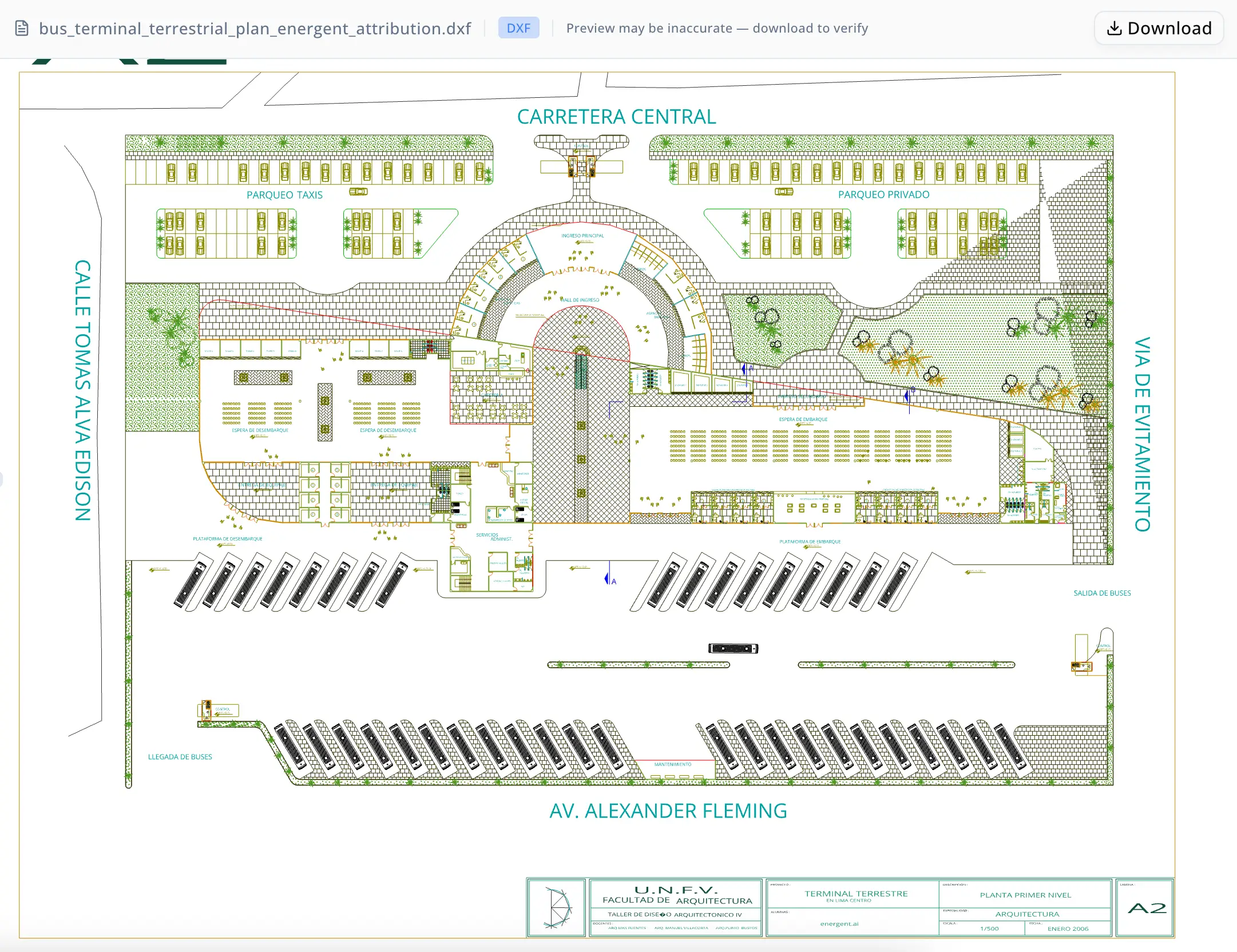
El dibujo sometido a auditoría era un plano DXF multizona de la distribución terrestre de una terminal de autobuses. Contenía objetos en al menos seis categorías funcionales: coches amarillos en un área de estacionamiento en superficie, sillas y mesas de comedor en una zona de food court, autobuses en la dársena de vehículos y una capa de vegetación en el lado derecho del plano dividida entre árboles grandes y arbustos pequeños.
En apariencia, esto suena a un despiece de cantidades estándar. En la práctica, el dibujo presentaba dos problemas estructurales que hacían poco fiable un enfoque sencillo de conteo de bloques.
Primero, los vehículos amarillos de la zona de estacionamiento habían sido explotados en lugar de colocarse como inserciones de bloque reutilizables. Lo que en un dibujo bien organizado habrían sido 33 símbolos de vehículo existía en cambio como 7,504 entidades de línea individuales, 4,778 entidades de arco y 67 entidades de círculo — un total de 12,349 primitivas repartidas por la capa vehiculos. No había ninguna referencia de bloque que contar; el analista tuvo que inferir el número de vehículos a partir de proxies geométricos, concretamente los 67 marcadores de círculo de las ruedas, y aplicar un factor de corrección para vehículos parciales o recortados en el borde del dibujo.
Segundo, los símbolos de mobiliario y actividad humana en la zona de la terminal no compartían ninguna convención de nomenclatura fiable. Un primer pase de clasificación identificó 60 instancias del bloque A$C206D7EC0 como candidatas a sillas y 11 instancias del bloque A$C05075C2A como candidatas a mesas. Ambos conteos eran incorrectos: la inspección visual reveló que el primer bloque era un símbolo de puerta o giro de puerta situado en la capa piso, y que el segundo era un símbolo de figura humana — ninguno de los dos era mobiliario. Las verdaderas sillas de comedor eran otro bloque completamente distinto (0Q62D en la capa mobiliario), con un total de 36 instancias. Las verdaderas piezas de mobiliario tipo mesa sumaban solo 4 objetos después de eliminar los símbolos humanos y de puerta.
Cada clasificación errónea requería un ciclo completo de reinspección: identificar el ID del bloque, comprobar la capa, examinar la geometría en contexto, actualizar el conteo y regenerar la salida de auditoría. Ejecutar esos ciclos manualmente —cargar diálogos de filtros, regenerar conjuntos de selección, exportar subdibujos— es el tipo de trabajo CAD iterativo que consume horas sin garantía de que la respuesta final sea defendible.
Por qué ahora
Los proyectos de infraestructura de transporte están sujetos a requisitos de documentación por fases. A medida que una terminal de autobuses pasa del desarrollo de diseño a los documentos de construcción, el equipo de diseño debe proporcionar una lista de cantidades verificada al estimador de costes y, cuando hay financiación pública involucrada, a la autoridad aprobadora. Un tipo de objeto mal clasificado —puertas contadas como sillas, vegetación confundida con estacionamiento estructurado— genera errores posteriores en las estimaciones de materiales, los cálculos de evacuación contra incendios y los presupuestos del proyecto.
En este caso, la auditoría era un requisito previo para una entrega documental. El dibujo había evolucionado a través de múltiples aportaciones de disciplinas, que es cómo la nomenclatura de capas se volvió inconsistente y la geometría de los vehículos terminó explotada. El técnico necesitaba un conteo final fiable antes de que el archivo se congelara y se emitiera para construcción.
Por qué energent.ai
Las alternativas del técnico eran limitadas. El conteo manual de bloques en AutoCAD requiere configurar filtros de capa, ejecutar comandos de conteo y verificar manualmente cada resultado — un proceso que escala mal cuando los IDs de bloque son cadenas hash semánticamente vacías como A$C206D7EC0. Escribir un script personalizado en Python usando una biblioteca de análisis DXF era técnicamente viable, pero requería tiempo de desarrollo que el equipo no tenía y producía una herramienta puntual sin un bucle interactivo de reclasificación.
Energent.ai ofrecía un modelo distinto: un agente conversacional que podía cargar el archivo DXF directamente, ejecutar comandos de Python y bash para analizar la geometría, producir archivos DXF de auditoría filtrados como salida e iterar sobre la lógica de clasificación mediante correcciones en lenguaje natural. El analista no necesitaba escribir código. Cuando un conteo era incorrecto, la corrección era una sola frase — "esos son símbolos de puerta, no sillas" — y el agente volvía a ejecutar la clasificación, excluía el bloque mal contado y producía un archivo de auditoría corregido dentro de la misma sesión.
Y, de forma crítica, energent.ai genera archivos intermedios de salida — un DXF por categoría de objeto — que el técnico puede abrir en su visor CAD habitual para verificar visualmente antes de aceptar el conteo. Esto cerró el ciclo entre el análisis automatizado y la aprobación humana de una manera que un script independiente o un panel de BI no pueden replicar.
Flujo de trabajo
Paso 1 — Carga del archivo y revisión de capas. El técnico cargó el DXF de la terminal de autobuses. El agente analizó los nombres de capa (vehiculos, mobiliario, piso, BUSES, vegetacion) y los IDs de bloque, y produjo un inventario preliminar de tipos de entidad distintos y conteos por capa.
Paso 2 — Aislamiento de vehículos. El analista pidió un conteo de coches amarillos en la zona de estacionamiento de la parte superior izquierda. El agente identificó que la capa vehiculos no contenía inserciones de bloque — solo geometría explotada de líneas, arcos y círculos que sumaba 12,349 primitivas. Aisló las 67 entidades de círculo como marcadores de ruedas y estimó 33 vehículos bajo la suposición de dos círculos de rueda por coche, con un marcador parcial en el borde del dibujo. Produjo un DXF de auditoría dedicado para verificación visual y marcó la estimación como derivada de geometría, no de conteo de bloques.
Paso 3 — Clasificación de mobiliario, primer pase. El agente identificó bloques candidatos a mobiliario en la zona central izquierda de la terminal y devolvió 60 instancias de un bloque como sillas y 11 de otro como mesas. El analista revisó el DXF de auditoría y corrigió la clasificación: el bloque de 60 conteos era un símbolo de puerta o giro de puerta en la capa piso; el bloque de 11 conteos era una figura humana. Ninguno debía aparecer en el conteo de mobiliario.
Paso 4 — Reclasificación de mobiliario, pase corregido. Aplicando las correcciones de contexto de forma y ubicación, el agente volvió a ejecutar la clasificación. Conservó el bloque 0Q62D en la capa mobiliario como 36 sillas de comedor, e identificó 4 candidatos a mobiliario tipo mesa (bloques dfy y SofaA2C) tras excluir todos los símbolos de puerta y figura humana. Produjo DXF de auditoría separados para las sillas de comedor, los candidatos a mesa y ambas categorías excluidas, permitiendo al analista confirmar cada exclusión de forma independiente.
Paso 5 — Autobuses y vegetación. El agente identificó 41 símbolos de autobús en la capa BUSES y, en el lado derecho del dibujo, distinguió 5 bloques de árboles grandes de 46 símbolos de arbustos pequeños, produciendo un DXF de auditoría nombrado para cada categoría.
Paso 6 — Paquete final de auditoría. El agente ensambló la tabla final completa de conteos, produjo un DXF completo del dibujo con atribución y generó un resumen en Markdown en lenguaje natural apto para incluirse en el paquete de documentación del proyecto.

Results
La auditoría produjo recuentos verificados para seis categorías de objetos en un dibujo que no contenía ninguna convención fiable de nomenclatura de bloques y un tipo de objeto completamente explotado:
| Object | Final count |
|---|---|
| Yellow cars (geometry-estimated) | 33 |
| Dining chairs | 36 |
| Table-like furniture candidates | 4 |
| Buses | 41 |
| Large trees | 5 |
| Small bushes | 46 |
Se detectaron y corrigieron tres clasificaciones erróneas iniciales: 60 símbolos de puerta/barrido de piso inicialmente etiquetados como sillas de la última fila, 11 símbolos de figura humana inicialmente etiquetados como mesas, y símbolos de vegetación que se habían confundido con la capa de vehículos durante la primera pasada. Cada ciclo de corrección tomó un único intercambio conversacional en lugar de una revisión manual completa.
El agente produjo 11 archivos DXF de auditoría con nombre —uno por categoría de objeto más dos archivos de verificación de exclusión— junto con un resumen completo en Markdown, sustituyendo lo que habría sido una hoja de cálculo de recuento manual por un registro de auditoría trazable, archivo por archivo, que cualquier miembro del equipo puede abrir y verificar.
Proof
"El dibujo había pasado por tres equipos de disciplina y los nombres de los bloques eran completamente opacos. No tenía forma de saber que A$C206D7EC0 era un símbolo de puerta sin abrir cada instancia individualmente. Lo que me dio energent.ai fue la capacidad de decir 'eso está mal' y recibir un archivo corregido de vuelta en segundos, en lugar de pasar otra hora en el gestor de capas."
— Técnico CAD, consultoría de infraestructura de transporte
El entregable que produjo el agente —el resumen en Markdown bus_terminal_dxf_tldr.md y el conjunto completo de DXF de auditoría por categoría— puede abrirse en cualquier visor compatible con DXF y cotejarse con el dibujo original. El DXF atribuido de todo el dibujo incorpora la procedencia de la auditoría directamente en el archivo, lo que hace que el resultado sea trazable para los registros del proyecto.
Trust note
El recuento de 33 coches amarillos es una estimación geométrica, no una certeza de recuento de bloques. Dado que los vehículos se dibujaron como primitivas explotadas en lugar de inserciones reutilizables, el recuento se basa en la suposición de que cada coche aporta exactamente dos marcadores de círculo de rueda al total de 67 círculos. Antes de usar este número en una medición oficial de cantidades o de presentarlo ante una autoridad reguladora, se requiere una inspección visual del DXF de auditoría de vehículos aislados frente al dibujo original. Del mismo modo, los candidatos a mobiliario tipo mesa representan geometría superviviente tras el filtrado de exclusión; un experto del dominio debería confirmar cada instancia frente a la intención arquitectónica antes de tratar el recuento como definitivo. La salida de Energent.ai acelera el ciclo de auditoría y detecta clasificaciones erróneas que los métodos manuales de recuento suelen pasar por alto, pero no sustituye la aprobación del técnico en clasificaciones ambiguas.