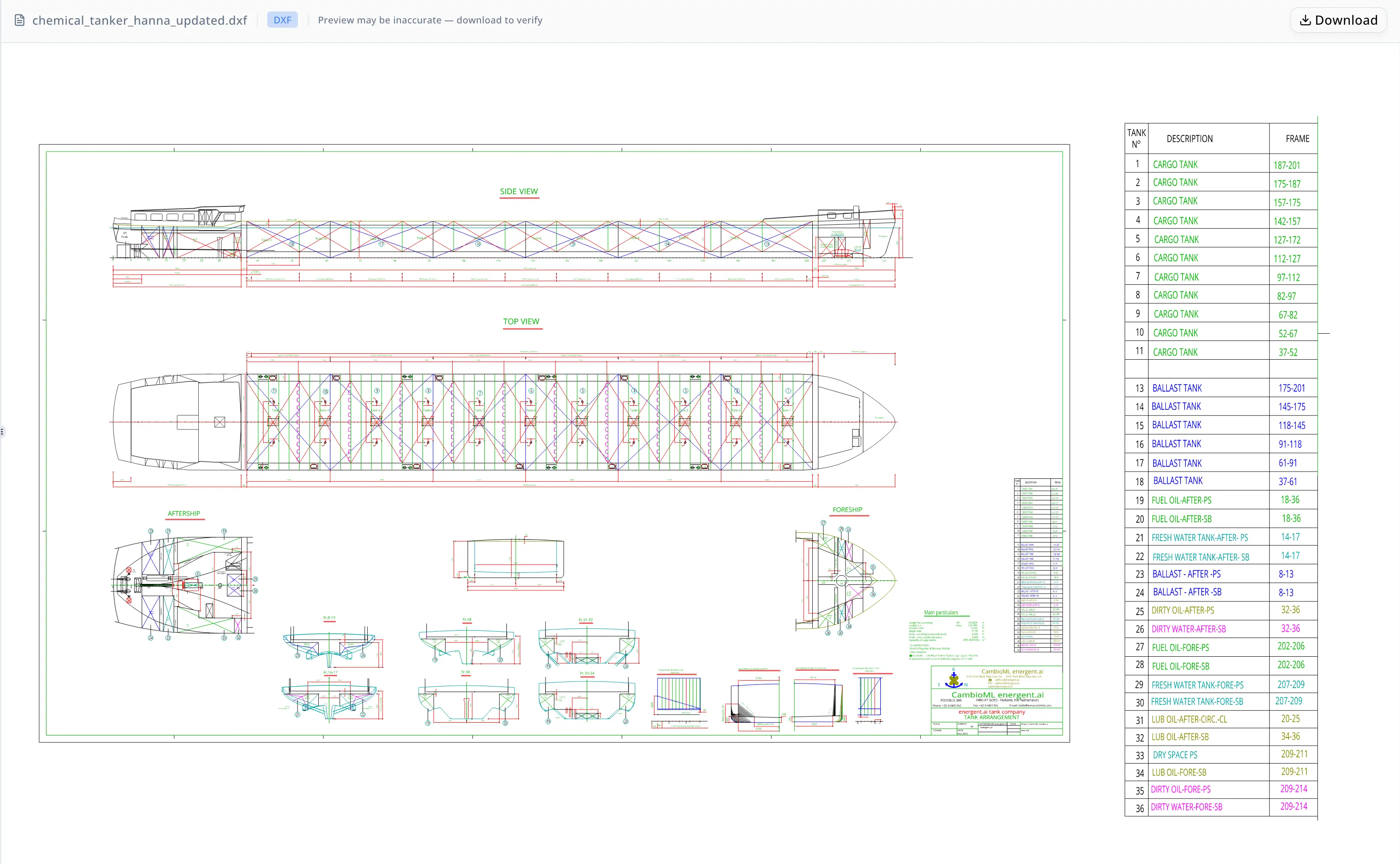
Perfil del cliente
El equipo trabaja dentro de una consultoría de arquitectura naval e ingeniería marina que presta servicio a operadores de buques tanque químicos, astilleros y organismos de clasificación en todo el sector del transporte marítimo comercial. Su trabajo de documentación se centra en planos DXF y DWG: convertir lo que reside en un archivo CAD en tablas estructuradas, cajetines actualizados y conjuntos de entregables formalmente empaquetados que realmente necesitan los astilleros y los inspectores de clasificación.
Un proyecto típico entrega un cuadro de tanques, un resumen de Main Particulars, al menos una revisión del cajetín y un plano de retorno en una versión DWG específica. Para el proyecto Hanna —un buque tanque químico— el alcance cubría exactamente este conjunto: dos tablas de datos estructurados, un cambio en el cajetín y una conversión de ida y vuelta a un AC1021 DWG validado. El equipo procesa varios buques en paralelo, por lo que el cuello de botella de la extracción manual se multiplica rápidamente en toda la cartera de proyectos.
Problema
Extraer datos estructurados de planos DXF no es una tarea de análisis de texto en el sentido habitual. Los planos de buques almacenan etiquetas, valores, dimensiones y anotaciones de cuadernas como entidades de texto DXF distribuidas por capas, sin una estructura coherente de filas y columnas que las herramientas de hojas de cálculo puedan leer directamente. El único método fiable es analizar el formato DXF mediante programación —o abrir el plano en una estación de trabajo CAD completa y teclear los valores a mano.
Para el proyecto Hanna, el objetivo de extracción era de dos tablas más siete líneas de medición independientes.
El bloque de Main Particulars contenía estas dimensiones del buque:
- Length for scantlings: 106.254 m
- Length overall: 109.999 m
- Breadth moulded: 13.500 m
- Depth moulded: 5.140 m
- Draft — scantling: 4.200 m
- Draft — maximum: 4.200 m
- Cargo tank capacity: 4,560 m³
Cada línea también llevaba calificadores —"abt." para aproximado, "mld." para moulded— que debían preservarse en la salida junto con los valores numéricos y las unidades. Perder o asignar mal un calificador cambia la interpretación de ingeniería de la dimensión.
La tabla de tanques planteaba un reto distinto. Un cuadro completo de tanques para un buque tanque químico de esta clase abarca muchos tanques numerados, cada uno con un rango de cuadernas y una capacidad asociada. El riesgo no es solo el error de extracción, sino la omisión silenciosa: una entrada de tanque faltante puede no detectarse hasta que el documento llega a un inspector de clasificación o al equipo de compras del astillero. En el flujo de trabajo anterior del equipo —abrir el plano en una estación CAD, leer manualmente los valores e introducirlos en Excel— una pasada completa de extracción para el plano de un solo buque llevaba la mayor parte de una jornada laboral y aun así dejaba ese riesgo sin resolver.
El proyecto también requería una conversión de DXF a DWG que produjera un archivo AC1021 válido. Ese estándar de versión (formato AutoCAD 2007) sigue siendo necesario en muchos sistemas CAD antiguos utilizados por organismos de clasificación y algunos astilleros. No basta con cambiar el nombre del archivo; el equipo necesitaba recuentos de entidades y confirmación de layouts para certificar la salida antes de la entrega.
Por qué ahora
Los organismos de clasificación y los sistemas de compras de los astilleros exigen cada vez más datos legibles por máquina junto con los planos. Un DWG o un PDF por sí solos ya no son suficientes cuando el sistema receptor necesita ingerir cifras de capacidad, rangos de cuadernas o particularidades del buque en una base de datos, o cotejarlos programáticamente antes de programar una inspección.
El proyecto Hanna representaba un punto de inflexión habitual: un buque que pasaba de la fase de revisión de planos a la presentación formal para clasificación, donde se requieren exportaciones de datos estructurados en paralelo con el plano actualizado. Los retrasos en esta fase se trasladan a la programación de inspecciones y, en última instancia, a la disponibilidad operativa del buque. El equipo necesitaba comprimir la fase de extracción y empaquetado sin introducir errores que obligaran a una nueva presentación.
Por qué energent.ai
El equipo evaluó tres enfoques antes de seleccionar energent.ai: un operador dedicado de estación de trabajo CAD que gestionara la extracción manualmente, un script interno de Python para análisis, y un modelo de lenguaje de propósito general sin capacidad directa de manejo de archivos.
La extracción manual seguía siendo necesaria para la confirmación visual final de anomalías señaladas, pero era demasiado lenta y dependiente del operador para la fase rutinaria de extracción y estructuración. El script interno de Python requería mantenimiento continuo a medida que las estructuras de los planos variaban entre tipos de buque y clientes. Un modelo de lenguaje de propósito general podía describir las convenciones del formato DXF, pero no podía cargar ni analizar el archivo por sí mismo.
energent.ai gestionó el flujo completo en una sola sesión. Cargó el archivo DXF, ejecutó Python para analizar las entidades de texto, estructuró la salida en columnas etiquetadas, aplicó cambios al cajetín in situ, convirtió el DXF actualizado a DWG con validación de versión y empaquetó seis archivos entregables. Y, de forma crítica, también ejecutó una pasada de auditoría independiente —deliberadamente aislada del proceso de extracción para evitar el sesgo de confirmación— que detectó dos anomalías antes de la entrega de los archivos. Ese comportamiento de auditoría era la capacidad que el equipo no podía reproducir con ninguna de las alternativas.
Flujo de trabajo
La sesión siguió una secuencia reproducible de siete pasos:
Paso 1 — Ingesta del plano. El equipo cargó el archivo DXF de Hanna. El agente analizó la estructura del archivo e identificó las tres regiones objetivo: el cuadro de tanques, el bloque de Main Particulars y el cajetín.
Paso 2 — Extracción de Main Particulars. El agente extrajo el bloque de siete líneas, asociando cada etiqueta de medición con su valor, unidad y calificador. Resultado: un libro de trabajo XLSX y un CSV, cada uno con anotaciones de columnas en lenguaje claro que explicaban calificadores como "abt." (aproximado) y "mld." (moulded).
Paso 3 — Extracción de la tabla de tanques. El cuadro completo de tanques se extrajo en una tabla estructurada que incluía números de tanque, rangos de cuadernas y valores de capacidad. Resultado: XLSX y CSV.
Paso 4 — Modificación del cajetín. Los reemplazos de texto solicitados en el cajetín se aplicaron directamente a los registros de entidades DXF. El agente confirmó los cambios inspeccionando el contenido de texto del archivo actualizado.
Paso 5 — Auditoría independiente. Una pasada de auditoría aislada revisó las salidas de extracción frente a los datos de origen. Se registraron dos hallazgos: el Tanque No. 12 no aparecía en la tabla de tanques extraída —se señaló como una cuestión de completitud en lugar de aceptarse silenciosamente— y el Tanque 5 presentaba un rango de cuadernas de 127–172 que parecía anormalmente amplio en comparación con las entradas adyacentes, lo que justificaba una revisión visual frente al plano de origen.
Paso 6 — Conversión y validación de DXF a DWG. El DXF actualizado se convirtió a DWG mediante un flujo de conversión estructurado. La validación confirmó: versión AC1021, dos layouts (Model y Layout1) y 3,753 entidades de modelspace. Se registró una advertencia de que la fidelidad visual depende de la configuración de fuentes de la estación receptora y de la disponibilidad de archivos SHX.
Paso 7 — Empaquetado de entregables. Se reunieron y confirmaron los seis archivos: XLSX de la tabla de tanques, CSV de la tabla de tanques, XLSX de Main Particulars, CSV de Main Particulars, DXF actualizado y DWG validado.

Resultados
Se produjeron seis entregables estructurados a partir de una única entrada DXF en una sola sesión:
- Siete dimensiones del buque extraídas en XLSX y CSV etiquetados, con los calificadores de unidad preservados
- 4,560 m³ de capacidad de carga capturados correctamente y asociados a su fila de tabla
- 3,753 entidades de modelspace validadas mediante la conversión de ida y vuelta del DWG (AC1021 confirmado)
- 2 alertas de auditoría detectadas antes de la entrega, evitando que errores silenciosos llegaran a los revisores posteriores
- 6 archivos entregables empaquetados, en el formato estándar de entrega a astillero y clasificación
El equipo también recibió una plantilla de sesión reproducible. La misma secuencia de siete pasos —ingestar, extraer Main Particulars, extraer la tabla de tanques, modificar el cajetín, auditar, convertir, empaquetar— puede aplicarse a planos de buques adicionales sin reconstruir el flujo de trabajo desde cero para cada proyecto.
Prueba
"Solíamos dedicar la mayor parte de una jornada laboral a un solo plano de buque, y aun así a veces pasábamos por alto entradas que solo salían a la luz durante la revisión de clasificación. Que el agente señalara un tanque faltante y un rango de cuadernas sospechoso antes de empaquetar los archivos fue exactamente el control que necesitábamos integrado en el proceso, no añadido manualmente al final." — Arquitecto Naval Principal, consultora de ingeniería marina
El conjunto completo de entregables que produjo el agente — XLSX y CSV de la tabla de tanques, XLSX y CSV de Main Particulars, DXF actualizado y DWG AC1021 validado — refleja el paquete estándar de entrega que el equipo presenta a compras de astillero y a los inspectores de clasificación. Las dos alertas de auditoría indican con precisión qué elementos requieren confirmación visual antes de la aprobación final, en lugar de dejar esa determinación al revisor posterior.
Nota de confianza
La salida DWG superó la validación estructural (formato AC1021, 3.753 entidades de modelspace confirmadas), pero la fidelidad visual exacta sigue dependiendo de la configuración de fuentes y de la disponibilidad de archivos SHX en la estación de trabajo receptora — una brecha que no puede resolverse sin una revisión en una estación de trabajo CAD. La auditoría señaló explícitamente que el Tanque No. 12 no aparecía en la tabla extraída y que el rango de cuadernas del Tanque 5 (127–172) podía ser anómalo en comparación con las entradas adyacentes. Ambos elementos requieren que un revisor humano abra el plano fuente y lo confirme visualmente antes de que la tabla de tanques se presente para revisión de clasificación o se incorpore a la documentación formal del buque. El CSV de Main Particulars está estructuralmente completo para las siete líneas principales, pero no constituye una hoja de especificaciones técnicas completa.
Preguntas frecuentes
¿Puede un agente de IA extraer una tabla de tanques de un plano DXF de un buque sin una estación de trabajo CAD?
Sí. energent.ai analiza archivos DXF directamente leyendo los registros de entidades del archivo en Python, sin requerir AutoCAD ni otra aplicación CAD. Extrae las entidades de texto asociadas al programa de tanques, las estructura en filas etiquetadas y exporta el resultado a XLSX y CSV. Para el proyecto del petrolero químico Hanna, el agente extrajo la tabla completa de tanques y señaló una entrada faltante — el Tanque No. 12 — antes de la entrega.
¿Cómo se convierte un archivo DXF en un DWG AC1021 válido y se valida la salida?
La conversión utiliza un flujo de trabajo estructurado de DXF a DWG que genera un archivo AC1021 (compatible con AutoCAD 2007). La validación comprueba la cadena de versión del DWG, enumera todos los layouts (Model y Layout1 para el proyecto Hanna) y cuenta las entidades de modelspace — 3.753 en este caso. La fidelidad visual en el DWG sigue dependiendo de la configuración de fuentes y SHX del visor receptor y requiere una revisión en una estación de trabajo CAD para la aprobación final.
¿Qué es el bloque de Main Particulars en un plano de buque y cómo puede exportarse a Excel?
El bloque de Main Particulars es una tabla resumen en un plano de buque que enumera las dimensiones clave: esloras, mangas, puntal, calados y capacidad de carga. Para el petrolero químico Hanna, el bloque incluía siete líneas, entre ellas una capacidad de tanque de carga de 4.560 m³. energent.ai extrae estos datos analizando las entidades de texto DXF, empareja cada etiqueta con su valor y su unidad, y exporta a XLSX y CSV con columnas anotadas.
¿Qué errores son comunes al extraer datos BOM de planos de buques?
El problema más común es la omisión silenciosa: un tanque o componente presente en el plano pero ausente en la tabla extraída. La auditoría de Hanna señaló que el Tanque No. 12 faltaba. Un segundo tipo es una anomalía de rango: el Tanque 5 mostró un rango de cuadernas de 127–172 que era más amplio que las entradas adyacentes, lo que indica o bien una lectura errónea de la extracción o una inconsistencia real en el plano. Ambos casos requieren confirmación visual frente al plano fuente antes de que los datos se envíen aguas abajo.
¿Puede un agente de IA modificar un cajetín de título DXF y devolver un DWG actualizado?
Sí. energent.ai aplica sustituciones de texto del cajetín directamente a los registros de entidades DXF, confirma los cambios mediante inspección de texto del archivo actualizado y luego convierte el resultado en un DWG validado. El proceso de ida y vuelta produce un archivo AC1021 estructuralmente válido. El equipo recibe tanto el DXF actualizado como el DWG como entregables separados en el paquete final.
¿Cuántos archivos produce un flujo de trabajo estándar de extracción CAD BOM y conversión DWG de ida y vuelta?
Para el proyecto Hanna, una sesión produjo seis entregables estructurados: una tabla de tanques en XLSX, una tabla de tanques en CSV, un bloque de Main Particulars en XLSX, un bloque de Main Particulars en CSV, un DXF actualizado con los cambios del cajetín aplicados y un DWG AC1021 validado. Esto coincide con el formato estándar de entrega para compras de astillero y presentaciones de clasificación.
Palabras clave SEO
extracción de datos DXF, conversión DWG, extracción BOM de planos de buques, automatización de arquitectura naval, documentación de petroleros químicos, modificación de cajetín de título, extracción de particularidades del buque, formato DWG AC1021, flujo de trabajo de ingeniería marina, exportación de CAD a Excel, extracción de tabla de tanques, conversión de DXF a DWG de ida y vuelta
Casos de uso relacionados
<!-- TODO: enlazar a las páginas hermanas de casos de uso una vez que se publique el conjunto relacionado. -->Esquema del artículo (JSON-LD)
{
  "@context": "https://schema.org",
  "@type": "Article",
  "headline": "Cómo un equipo de ingeniería marina entregó 6 archivos CAD validados a partir de un único plano de buque tanque químico con energent.ai",
  "description": "Una consultoría de arquitectura naval e ingeniería marina utilizó energent.ai para extraer un cuadro de tanques y un bloque de Main Particulars a partir de un plano DXF de un buque tanque químico, aplicar modificaciones al cajetín y entregar seis archivos estructurados —incluido un DWG AC1021 validado con 3.753 entidades en modelspace— en una sola sesión, con una auditoría independiente que detectó dos anomalías de extracción antes de la entrega.",
  "keywords": "extracción de datos DXF, conversión DWG, extracción BOM de planos de buques, automatización de arquitectura naval, documentación de petroleros químicos, modificación de cajetín de título, extracción de particularidades del buque, formato DWG AC1021, flujo de trabajo de ingeniería marina, exportación de CAD a Excel, extracción de tabla de tanques",
  "articleBody": "Una consultoría de arquitectura naval e ingeniería marina procesó un plano DXF de un buque tanque químico utilizando energent.ai, extrayendo un bloque de Main Particulars de siete líneas —que incluye una capacidad de tanques de carga de 4.560 m³ y dimensiones del buque que abarcan desde 106,254 m de eslora para scantlings hasta 13,500 m de manga moulded— y un cuadro completo de tanques. El agente aplicó las modificaciones solicitadas al cajetín, ejecutó una auditoría independiente que señaló el Tanque N.º 12 como faltante y el rango de cuadernas 127–172 del Tanque 5 como anómalo, y luego convirtió el DXF actualizado en un DWG AC1021 validado con 3.753 entidades en modelspace confirmadas. Seis entregables estructurados quedaron empaquetados y listos para las compras del astillero y la entrega de clasificación en una sola sesión.",
  "author": {
    "@type": "Organization",
    "name": "energent.ai"
  },
  "publisher": {
    "@type": "Organization",
    "name": "energent.ai"
  },
  "about": [
    {
      "@type": "Thing",
      "name": "Extracción de datos CAD"
    },
    {
      "@type": "Thing",
      "name": "Arquitectura naval"
    },
    {
      "@type": "Thing",
      "name": "Conversión de DXF a DWG"
    }
  ]
}