Perfil del cliente
El equipo es una pequeña firma de arquitectura y planificación de instalaciones que gestiona proyectos institucionales de servicios de alimentación: cafeterías, comedores y cocinas comerciales para clientes públicos y corporativos. Los socios y gerentes de proyecto dividen su tiempo entre el trabajo de diseño en AutoCAD y tareas de entrega posteriores: tabulaciones de áreas, programas de salas y documentos de especificaciones que deben llegar a Excel o Word para revisión del cliente, estimación de costos y presentaciones para permisos.
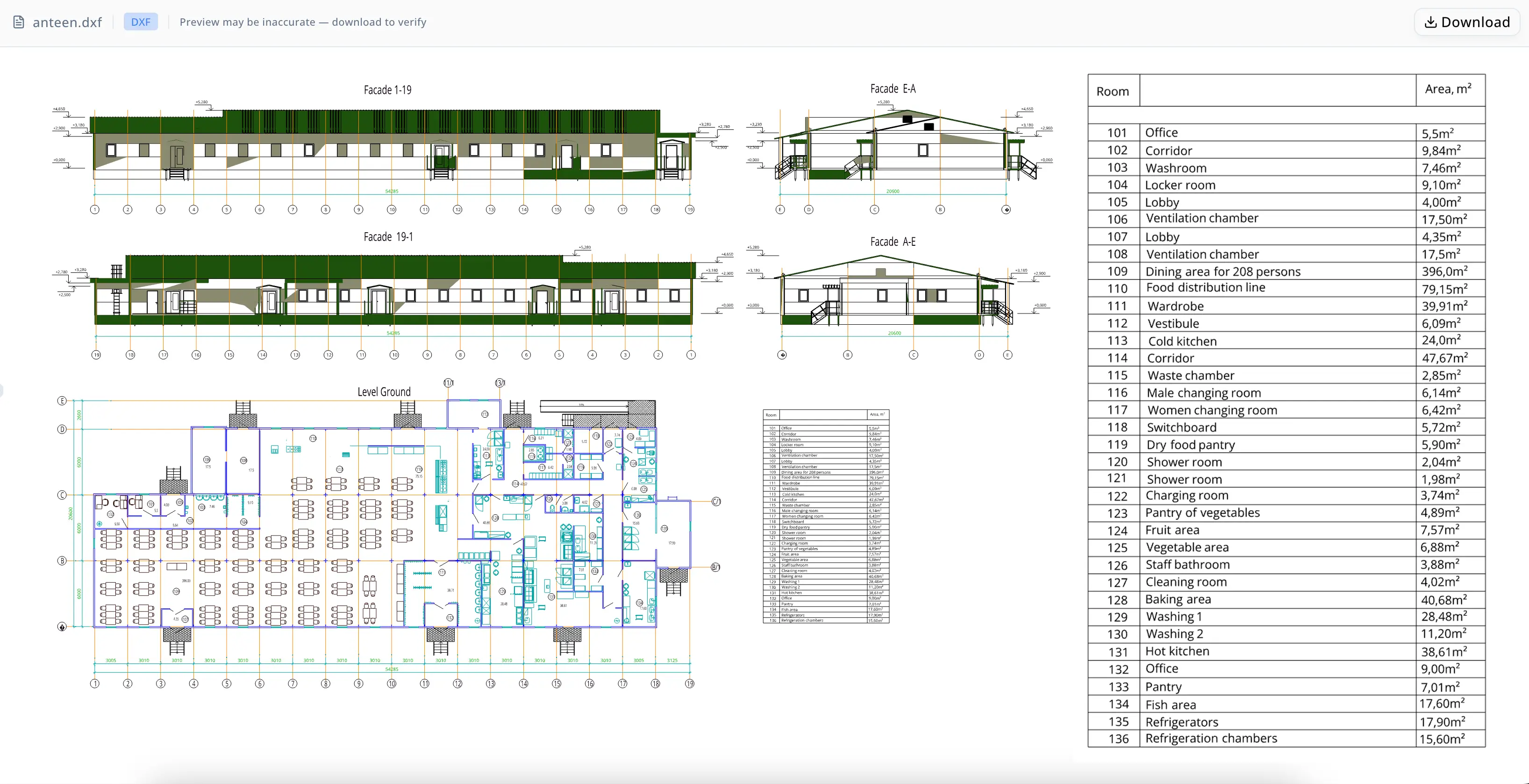
El proyecto de este caso de estudio era una instalación de comedor para 208 personas con más de 20 zonas funcionales distintas: áreas de producción de cocina caliente y fría, estaciones de preparación de pescado, verduras, frutas y panadería, almacenamiento seco y refrigerado, cámaras de refrigeración, vestuarios del personal, duchas, taquillas, una oficina, un espacio de cuadro eléctrico y una cámara de ventilación. La precisión del programa de salas importa en la entrega: los errores en las cifras de área se trasladan a las estimaciones de construcción, las revisiones de cumplimiento normativo y las licitaciones de acondicionamiento interior. Un solo decimal transpuesto en una columna de área puede propagarse por un plan de costos antes de que alguien lo detecte.
Problema
La tarea inmediata era sencilla sobre el papel: exportar el programa de salas incrustado en la esquina inferior derecha del dibujo DXF de la instalación a un archivo Excel para entregarlo al cliente. En la práctica, el archivo de origen presentaba varios problemas acumulativos.
El DXF contenía 25,123 entidades: una mezcla de objetos LINE, INSERT, ARC, LWPOLYLINE, HATCH, TEXT, MTEXT y DIMENSION. El programa de salas existía solo como geometría de texto dispersa por el lienzo del dibujo, no como un objeto de base de datos estructurado ni como una capa dedicada al programa. No había encabezados de columna fiables para la columna de número de sala; los números aparecían en el cuerpo del programa, pero sin una etiqueta de encabezado coincidente en la región de texto extraída, lo que obligaba a reconstruirlo mediante inferencia basada en coordenadas en lugar de un etiquetado simple.
Los enfoques manuales eran lentos y propensos a errores. Abrir un archivo de 25,000 entidades en AutoCAD para copiar y pegar una tabla de 36 filas en Excel llevaba tiempo real y añadía riesgo de transcripción: números mal leídos, filas omitidas y separadores decimales perdidos. Los valores de área en el dibujo de origen usaban un formato inconsistente: algunas celdas mostraban "17,5m²" y otras "17,50m²" — lo que significaba que incluso una exportación manual cuidadosa dejaría texto no numérico en una columna que cualquier fórmula SUM omitiría en silencio.
Tres salas (101–103) estaban en el borde superior de la región del programa, donde un filtro espacial normalmente las recortaría. Una entrega sutilmente incompleta — un programa que empieza en la sala 104 en lugar de la 101 — podría pasar desapercibida hasta que el cliente o el estimador de costos notara la ausencia.
Por qué ahora
Los plazos de entrega de instalaciones se comprimen al final de las fases de diseño. Cuando un proyecto de cafetería pasa de diseño esquemático a documentos de construcción, tanto el propietario como el contratista general necesitan rápidamente programas de salas, tabulaciones de áreas y especificaciones de acabados. Los retrasos en producir una entrega limpia en Excel — incluso un día mientras alguien transcribe manualmente una tabla CAD de 36 filas — generan presión de cuello de botella sobre los hitos de estimación y permisos que tienen fechas límite externas fijas.
Para una firma pequeña, además, no hay un coordinador BIM ni un técnico CAD dedicado que absorba este trabajo de extracción. El arquitecto o gerente de proyecto que dibujó el plano suele ser la misma persona que exporta el programa. El tiempo dedicado a la transcripción es tiempo que no se dedica al diseño ni a la comunicación con el cliente. Automatizar la extracción, incluso para un solo dibujo, reduce la carga por proyecto de una manera que se acumula a lo largo de una cartera de encargos de servicios de alimentación con requisitos de documentación similares.
Por qué energent.ai
El equipo necesitaba una herramienta que pudiera aceptar un archivo DXF directamente, razonar espacialmente sobre la disposición de los elementos de texto y producir una salida limpia en Excel, sin requerir un script personalizado, una licencia de complemento BIM ni una macro de hoja de cálculo reconstruida para cada proyecto.
Las alternativas se quedaban cortas de formas previsibles. El asistente de extracción de datos integrado de AutoCAD funciona bien cuando los datos del programa viven en atributos estructurados de bloques; no maneja tablas dibujadas como geometría de texto plano. Las herramientas OCR basadas en hojas de cálculo pueden procesar exportaciones PDF desde AutoCAD, pero introducen un paso adicional de exportación y reducen la precisión cuando la geometría del dibujo se superpone al texto. Contratar a un técnico CAD para transcribir la tabla manualmente era la ruta por defecto, pero añadía costo y tiempo de respuesta para una tarea que, en principio, debería ser determinista y verificable.
energent.ai aceptó el DXF en bruto, lo cargó sin preprocesamiento y utilizó razonamiento basado en coordenadas para aislar la región del programa en la esquina inferior derecha del resto del dibujo de 25,000 entidades. Ejecutó lógica de extracción basada en Python directamente sobre la geometría del DXF, reconstruyó la tabla fila por fila a partir de la posición espacial, infirió el encabezado faltante "Number" a partir de la estructura de los datos y produjo un libro de Excel con formato — todo dentro de una sola sesión. Luego, un subagente de auditoría independiente reextrajo el programa desde cero y verificó la salida antes de la entrega final.
Flujo de trabajo
Paso 1 — Ingesta del archivo. El arquitecto cargó el archivo DXF directamente en energent.ai. El agente validó el archivo de inmediato: formato AutoCAD R2018 (versión interna AC1032), dos layouts detectados ("Model" y un layout con marca de agua), 25,123 entidades de modelspace que abarcaban geometrías LINE, TEXT, MTEXT, INSERT, HATCH, ARC, LWPOLYLINE y DIMENSION.
Paso 2 — Evaluación del contexto del dibujo. Antes de acotar el foco, el agente examinó el dibujo completo. Identificó el tipo de edificio (instalación de comedor para 208 personas), catalogó más de 20 zonas funcionales nombradas en producción de cocina, almacenamiento y áreas de personal, y confirmó que el programa de salas estaba incrustado como geometría de texto en la esquina inferior derecha, en lugar de en un bloque estructurado o un objeto de tabla.
Paso 3 — Aislamiento de la región y extracción de texto. El agente extrajo todos los elementos de texto con sus coordenadas X/Y y luego filtró el grupo de la esquina inferior derecha que contenía el programa. Reconstruyó la tabla fila por fila a partir de la posición espacial — emparejando números de sala, nombres de sala y valores de área según sus coordenadas relativas — en lugar de basarse en nombres de capas CAD o en el tipo de objeto.
Paso 4 — Recuperación de encabezados. El agente localizó los encabezados de columna para "Room" y "Area, m²" en el texto del dibujo. Como no aparecía ningún texto de encabezado explícito para la columna de número de sala, el agente aplicó "Number" como encabezado de Excel basándose en el contenido y la posición de la columna. La auditoría posterior confirmó que esto era apropiado dada la estructura del programa.
Paso 5 — Verificación de completitud y segunda pasada. El filtro inicial de la región de extracción recortó las salas 101–103 en la parte superior del programa. El agente detectó la brecha, amplió los límites verticales de extracción y regeneró el libro sin intervención del usuario. El archivo final contenía las 36 filas, numeradas del 101 al 136.
Paso 6 — Exportación a Excel. El agente produjo el libro con una hoja llamada "Room Table", una fila de encabezado resaltada en amarillo en las tres columnas y 36 filas de datos en el orden del dibujo. Los valores de área se conservaron tal como estaban en el origen — "17,5m²" y "17,50m²" — para que el arquitecto pudiera decidir cómo normalizarlos para cálculos posteriores en lugar de que el agente sobrescribiera silenciosamente el formato de origen.
Paso 7 — Auditoría independiente. Un subagente reextrajo de forma independiente el programa desde el DXF de origen sin depender de la lógica del agente principal y luego comparó cada fila con el archivo de Excel. Veredicto: PASS. Sin filas faltantes, sin filas extra, sin duplicados, sin problemas de orden en las 36 entradas.

Resultados
- 36 habitaciones extraídas, cubriendo el rango completo desde la habitación 101 hasta la habitación 136 sin omisiones en la entrega final.
- Libro de Excel de 37 filas producido (1 fila de encabezado amarilla + 36 filas de datos) con la estructura de columnas correcta, nombre de hoja y formato de encabezado listos para la entrega al cliente.
- 3 habitaciones recuperadas (101–103) que el filtro regional inicial pasó por alto — el agente se autocorrigió sin intervención del usuario en lugar de entregar una tabla incompleta de forma silenciosa.
- Auditoría independiente aprobada con una coincidencia exacta en número de habitación, nombre de habitación y texto de área en las 36 filas — no se encontraron discrepancias entre la salida de Excel y la fuente DXF.
- Transcripción manual eliminada para una tabla de 36 filas y 3 columnas incrustada en un dibujo de 25,123 entidades, eliminando el riesgo de que errores de copiar y pegar se propagaran a las cifras de área utilizadas para la estimación de costos.
La única tarea pendiente para el equipo era la normalización de los valores de área: el formato mixto del dibujo fuente significa que la columna de área no puede sumarse directamente en Excel hasta que los valores se conviertan a números. Energent.ai lo señaló explícitamente y ofreció añadir una columna numérica normalizada como paso posterior — un punto de entrega limpio en el que el arquitecto conserva el control sobre las convenciones del separador decimal y el manejo de unidades.
Prueba
"El dibujo tenía 25,000 entidades y el programa estaba solo como texto disperso en una esquina — no había una capa limpia desde la que exportar. El agente encontró la tabla, detectó las tres habitaciones que faltaban en la parte superior y me entregó un Excel verificado con una fila de encabezado amarilla. El resultado de la auditoría fue lo que me convenció: una segunda pasada que confirmó de forma independiente cada número de habitación y área frente al DXF, no solo que el agente afirmara que se veía bien."
— Arquitecto y líder del proyecto en la entrega de la instalación de comedor
El libro de trabajo entregado contiene el programa completo de 36 habitaciones en una hoja llamada "Room Table", con las columnas "Number," "Room," y "Area, m²," ordenadas según el orden del dibujo desde la habitación 101 hasta la habitación 136. La confirmación de auditoría independiente — PASS, sin filas faltantes, extra, duplicadas o desordenadas — forma parte del registro de la sesión y está disponible para la documentación del proyecto.
Nota de confianza
Los valores de área en la salida de Excel son cadenas de texto, no números, porque el DXF de origen utilizó un formato inconsistente que el agente preservó en lugar de normalizarlo silenciosamente. Antes de usar la columna "Area, m²" en fórmulas SUM o en cálculos de total de área, el equipo debe convertir los valores a números y confirmar que las convenciones del separador decimal coincidan con la configuración regional del proyecto (coma vs. punto). El encabezado de la columna "Number" se infirió a partir de la estructura de columnas en lugar de extraerse de una etiqueta explícita en el dibujo — apropiado para este archivo, pero conviene volver a comprobarlo con el estándar de programa de habitaciones del proyecto antes de enviarlo a un cliente o a una autoridad competente para el conjunto de permisos.