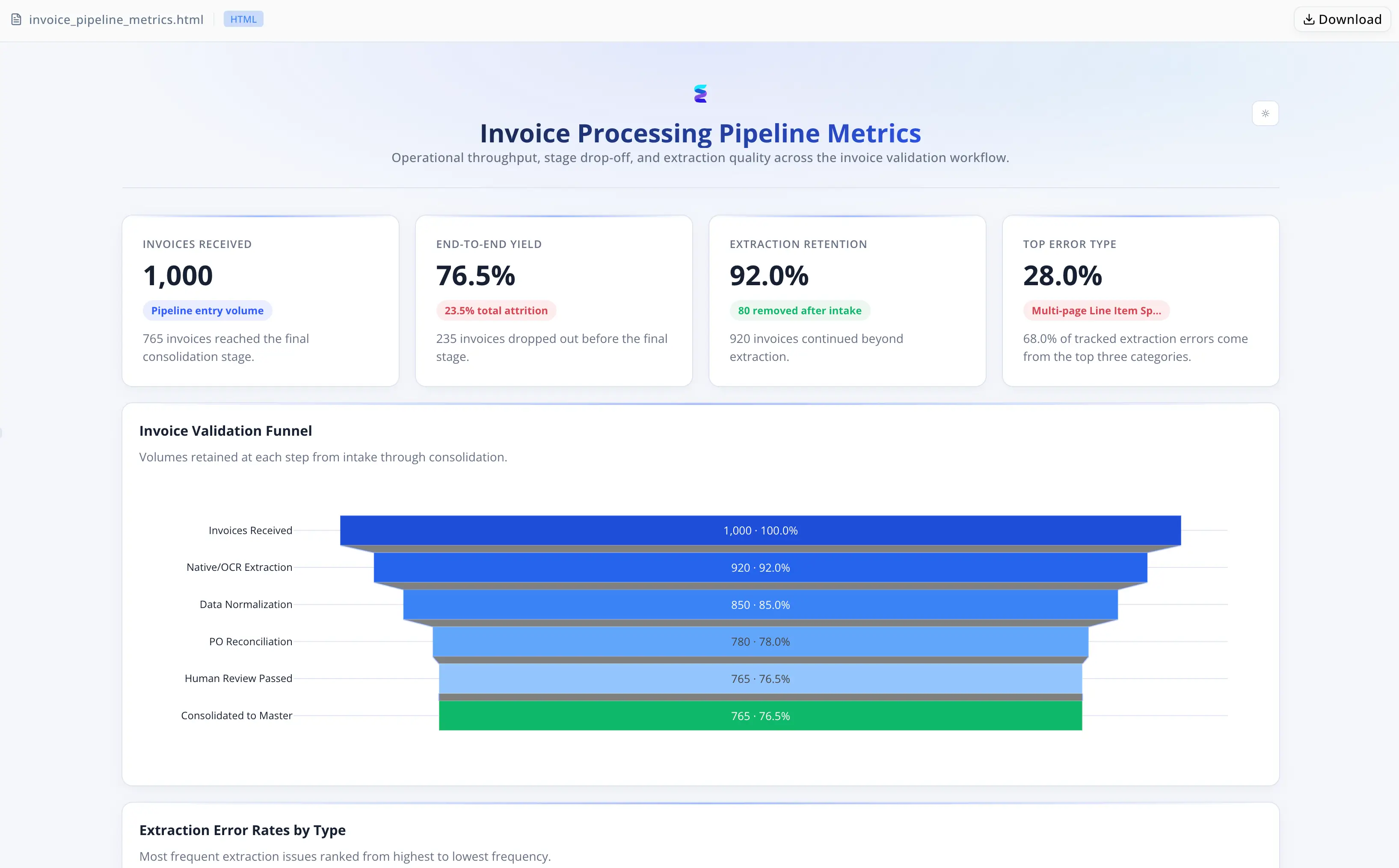
Meridian Apparel es una marca de bienes de consumo de tamaño medio que abastece sus productos desde fábricas en el extranjero en múltiples regiones. Dos o tres analistas de compras concilian cada factura entrante de proveedor contra la base de datos de OC abiertas de la empresa y la lista maestra de proveedores antes de que los datos fluyan hacia los sistemas de finanzas e inventario. Los errores en el libro de trabajo maestro se propagan directamente a los paquetes de reporting revisados por el CFO.
Los saltos de página, las celdas combinadas y los números de OC ocultos estaban rompiendo silenciosamente la hoja maestra
En cada ciclo mensual, el equipo procesaba docenas de facturas con hasta 50 líneas cada una — que llegaban como PDFs escaneados, archivos digitales nativos y libros de Excel con diseños de celdas combinadas. La consolidación era casi totalmente manual: abrir cada factura, interpretar visualmente, introducir a mano cada fila.
Tres modos de fallo se acumulaban entre sí. Los saltos de página generaban SKU huérfanos con cantidades nulas — registros que parecían completos pero estaban estructuralmente rotos. Las plantillas de Excel de proveedores con celdas combinadas provocaban filas en blanco que los analistas rellenaban de forma inconsistente. Los proveedores que ocultaban referencias de OC en encabezados de texto libre — "Re: Your order 45992-A" — activaban banderas de OC no conciliada y ciclos de corrección separados. La conciliación matemática detectaba aproximadamente 90% de los errores OCR en líneas partidas, pero solo después de que la introducción de datos ya se había completado. Un impulso estacional para incorporar de tres a cinco nuevas fábricas y una iniciativa de finanzas que comprimía los plazos de pago de net-45 a net-30 rompieron el modelo informal de escalado: ahora los lotes de facturas tenían que superar la validación en un solo día hábil.
Energent.ai se convirtió en el pipeline integral de consolidación
El equipo evaluó una suite ampliada de macros de Excel y una solución OCR puntual independiente. Ambas trataban la ingesta y la validación como pasos desconectados; ninguna podía conciliar los valores extraídos con la lista maestra de proveedores o la base de datos de OC abiertas. Energent.ai gestionó el pipeline completo en una sola sesión de agente:
- Enrutó cada documento según la presencia de capa de texto — los PDFs nativos se procesaban directamente, los PDFs escaneados mediante extracción visual — eliminando la deriva de coordenadas
- Extrajo líneas a través de saltos de página anclándose en los encabezados de tabla en lugar de en los límites de página
- Rellenó hacia adelante las columnas de celdas combinadas — nombre de la fábrica, código de estilo, número de OC — para reflejar la intención del proveedor
- Recuperó números de OC ocultos mediante regex sobre el bloque de texto completo, anotando los valores recuperados con una bandera
source: text_recovery - Ejecutó validación en dos fases antes del append: la Fase 1 normalizó fechas y campos numéricos; la Fase 2 cotejó la lista maestra de proveedores, validó las OC abiertas y ejecutó comprobaciones matemáticas a nivel de línea y de factura
- Agrupó las excepciones por código de fallo —
vendor_unmatched,math_fail,po_not_found,confidence_below_85pct— en una pestaña dedicada sin tocar los datos validados
Sin pipeline OCR personalizado. Sin script de validación separado. Sin suite de macros frágil que mantener.
La validación pasó a realizarse antes del append a la hoja maestra
- Control de confianza al 85%. Los registros por debajo del umbral nunca llegan a la hoja maestra — aterrizan en la pestaña de staging con el motivo del fallo adjunto.
- Comprobaciones matemáticas antes, no después. La conciliación a nivel de línea y de factura se ejecuta como parte del pipeline automatizado, detectando ~90% de los errores en líneas partidas antes de que corrompan el libro de trabajo.
- Enrutamiento agnóstico al formato. Los PDFs escaneados, los PDFs nativos y los libros de Excel se ejecutan en la misma sesión; el tipo de documento determina la ruta de extracción, no el criterio del analista.
- Cola de excepciones anotada. Cada registro marcado lleva un código de fallo específico, sustituyendo las correcciones informales ad hoc por una lista de revisión priorizada.

De dos a tres días de analista por lote a revisión solo por excepciones
- Los lotes de diez facturas con entre 30 y 50 líneas cada una antes requerían dos a tres días de analista; ahora el procesamiento directo gestiona todos los registros que superan la conciliación de la Fase 2 sin intervención del analista
- La normalización de relleno hacia adelante y la recuperación de OC por regex eliminaron dos categorías de error silencioso de extracción en todos los formatos de plantilla de proveedor
- La pestaña de staging etiquetada — cada excepción anotada con un código de fallo específico — sustituyó un proceso de corrección informal por una cola clara y accionable
"Lo que cambió es que dejamos de tratar la validación como algo que ocurre después de la introducción de datos. Las excepciones quedan en una pestaña de staging con el motivo ya adjunto — sabemos exactamente qué corregir y por qué antes de tocarlo." — Priya Sharma, Responsable de Operaciones de Compras en Meridian Apparel