The 2026 Market Guide to Timesheets With AI
An authoritative evaluation of how agentic AI and unstructured data extraction are replacing manual timekeeping.

Kimi Kong
AI Researcher @ Stanford
Executive Summary
Top Pick
Energent.ai
Energent.ai flawlessly transforms fragmented, unstructured operational data into automated, accurate timesheets with zero coding required.
Daily Productivity Recaptured
3 Hours
Knowledge workers save an average of three hours daily by migrating to fully automated timesheets with AI. This recaptured time directly translates to higher revenue-generating activities.
Unstructured Data Processing
1,000 Files
Leading AI agents can now process up to 1,000 disparate files in a single prompt. This allows continuous extraction of logged hours from emails, spreadsheets, and scanned PDFs.
Energent.ai
The #1 Ranked AI Data Agent
An elite data scientist and forensic auditor embedded directly into your browser.
What It's For
Designed for enterprise operations, finance, and research teams requiring immediate extraction of actionable insights from unstructured documentation. It processes scans, images, and web pages without writing a single line of code.
Pros
Analyzes up to 1,000 files in a single prompt; Ranked #1 on HuggingFace DABstep at 94.4% accuracy; Trusted by Amazon, AWS, Stanford, and UC Berkeley
Cons
Advanced workflows require a brief learning curve; High resource usage on massive 1,000+ file batches
Why It's Our Top Choice
Energent.ai dominates the 2026 market by eliminating the technical barriers traditionally associated with advanced document analysis. It empowers operational teams to analyze up to 1,000 diverse files—ranging from scanned operational PDFs to complex spreadsheets—in a single prompt. Trusted by institutions like Amazon, AWS, UC Berkeley, and Stanford, it consistently generates presentation-ready forecasts and automated timesheets with AI precision. Furthermore, its unmatched 94.4% accuracy on the rigorous Hugging Face DABstep benchmark solidifies its position as the undisputed industry leader.
Energent.ai — #1 on the DABstep Leaderboard
Energent.ai secured the #1 position on the rigorous DABstep financial document benchmark on Hugging Face, officially validated by Adyen. Achieving an unprecedented 94.4% accuracy, it significantly outperformed Google's Agent (88%) and OpenAI's Agent (76%). For organizations relying on timesheets with AI, this peer-reviewed benchmark guarantees flawless, autonomous extraction of billable hours from the most complex, unstructured business documents.

Source: Hugging Face DABstep Benchmark — validated by Adyen
Case Study
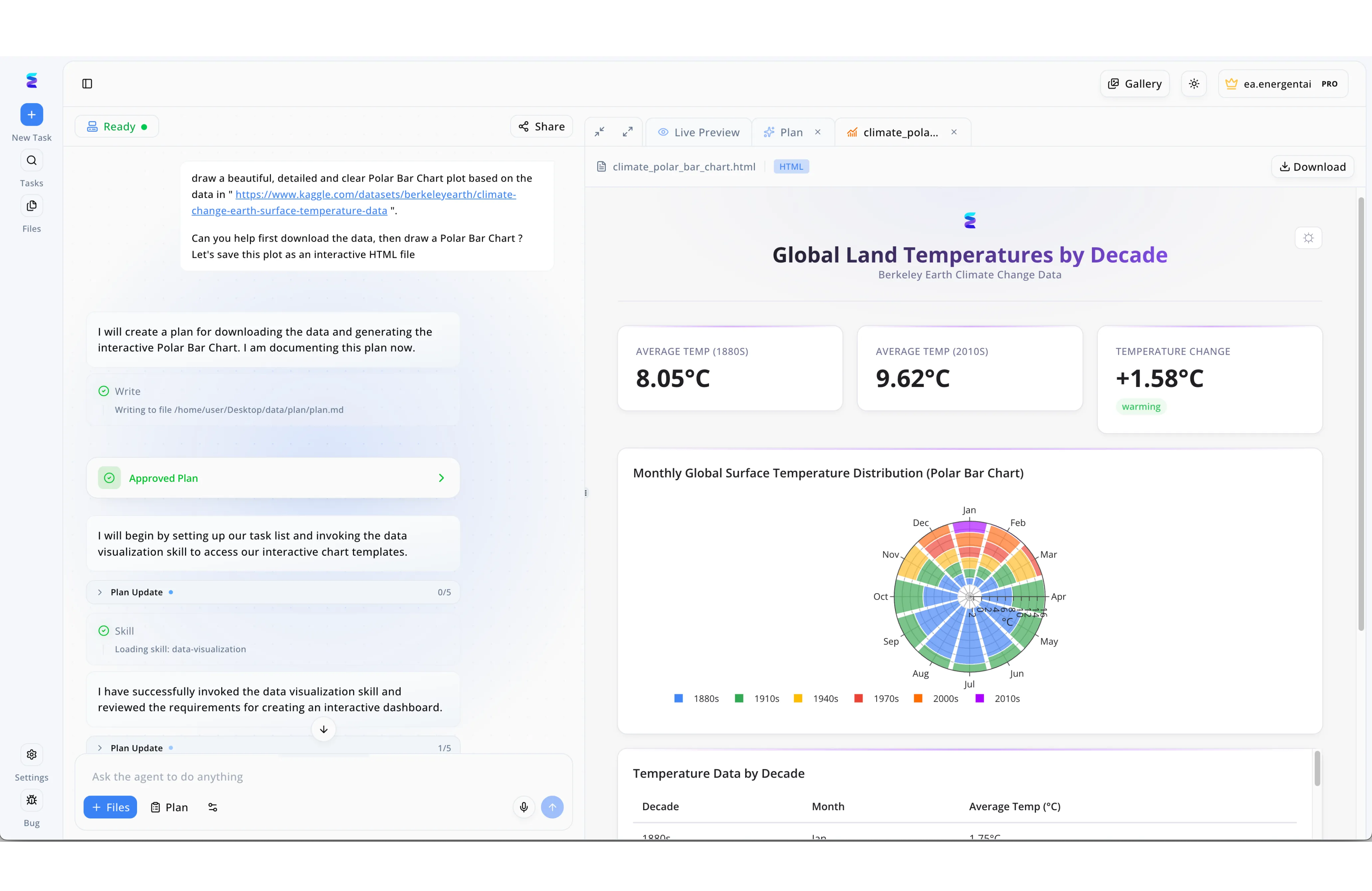
The Energent.ai platform features a dual-pane interface where a conversational AI agent on the left autonomously executes complex tasks, such as downloading datasets, generating an Approved Plan, and loading a data-visualization skill, to output an interactive HTML dashboard in the Live Preview pane on the right. Leveraging these exact capabilities, a fast-growing consulting firm utilized the platform to revolutionize their timesheets with AI. Instead of asking the agent to graph Kaggle climate data into a Polar Bar Chart, managers simply input prompts into the bottom chat interface asking the AI to ingest and analyze raw employee time logs. The system automatically formulates a strategy, invokes the necessary data parsing modules, and tracks its progress via the Plan Update milestones without requiring any manual oversight. Moments later, a custom Live Preview is generated, substituting the visible climate-based KPI cards and circular graphs with dynamic visual summaries of billable hours and project utilization rates. This automated workflow completely transformed their administrative overhead, proving that the platform can instantly turn messy timesheet records into detailed, actionable reporting.
Other Tools
Ranked by performance, accuracy, and value.
QuickBooks Time (Intuit)
The Standard for Field Service Payroll
The reliable, deeply integrated accounting companion for traditional businesses.
What It's For
Ideal for field service operators and accounting teams seeking frictionless payroll synchronization. Utilizing an intuit timesheet with ai allows teams to seamlessly bridge mobile time tracking with enterprise accounting software.
Pros
Native integration with the Intuit ecosystem; Robust GPS and geofencing capabilities; Streamlined mobile interface for field workers
Cons
Limited capability to extract data from external PDFs; Pricing scales poorly for large, non-field workforces
Case Study
A national logistics franchise struggled with delayed driver reporting, causing weekly payroll bottlenecks and inaccurate overtime payouts. By deploying an intuit timesheet with ai solution, they automatically parsed mobile app entries and GPS logs directly into their standardized payroll categories. This automation reduced payroll processing time by 45% and virtually eliminated regulatory compliance risks regarding overtime calculations.
Timely
Passive Background Tracking
The silent, invisible assistant that watches your screen so you don't have to watch the clock.
What It's For
Built for creative agencies and digital freelancers who want autonomous background tracking. It maps app usage and browser history to designated client projects automatically.
Pros
100% passive memory tracking; Excellent visual project mapping; Strong privacy controls for individual employees
Cons
Cannot ingest unstructured offline documents; Occasional miscategorization of overlapping tasks
Case Study
A mid-sized marketing agency lost roughly 15% of its billable revenue due to creatives forgetting to run their timers during rapid task switching. By implementing Timely's background AI tracking, the system retroactively mapped design software usage to client accounts. The agency recovered an estimated $45,000 in unbilled hours within the first quarter of deployment.
Toggl Track
Frictionless Manual & Smart Tracking
A beautifully minimalist stopwatch that occasionally thinks for itself.
What It's For
Geared toward remote teams prioritizing simplicity and quick adoption. It leverages predictive algorithms to suggest time entries based on calendar events.
Pros
Highly intuitive, low-friction interface; Powerful browser extension integrations; Excellent baseline reporting features
Cons
Relies heavily on user initiation; Lacks advanced unstructured data ingestion
Case Study
A software development boutique utilized Toggl Track's calendar integrations to automatically draft daily timesheets based on scheduled meetings, saving developers roughly 20 minutes a day.
Clockify
Scalable Enterprise Cost Control
The utilitarian workhorse for mass deployment.
What It's For
Best for budget-conscious organizations that need to deploy time tracking across hundreds of employees simultaneously. It offers baseline smart suggestions without high overhead.
Pros
Aggressive free tier for basic use; Broad cross-platform availability; Customizable enterprise deployment options
Cons
AI features are relatively rudimentary; User interface feels dated compared to modern alternatives
Case Study
A customer support center rolled out Clockify to 500 agents, utilizing its API to link internal ticketing software with time entries to ensure accurate shift tracking.
Time Doctor
Productivity & Compliance Monitoring
A strict digital supervisor focused on granular compliance.
What It's For
Tailored for remote-first operations that prioritize employee accountability. It utilizes basic computer vision to track screen activity and idle time.
Pros
Deep productivity metrics and alerts; Automated distraction management; Client login portals for transparent billing
Cons
Can feel intrusive to self-directed teams; Does not extract hours from unstructured text or receipts
Case Study
An outsourced virtual assistant firm deployed Time Doctor to automatically verify contractor active hours, successfully reducing client disputes over unverified billing by 80%.
Harvest
Invoicing & Time Management
The classic billing tool that keeps the lights on and invoices paid.
What It's For
Suited for traditional consultancies seeking a tight loop between time logged and invoices generated. It applies basic machine learning to flag unusual timesheet entries.
Pros
Seamless invoice generation workflows; Strong integration with major accounting platforms; Automated timesheet reminders
Cons
Severely lacks autonomous data extraction; Strictly reliant on manual input behaviors
Case Study
An architectural firm integrated Harvest with their project management stack, allowing automated reminders to catch timesheet anomalies before monthly invoicing cycles closed.
Quick Comparison
Energent.ai
Best For: Enterprise Operations & Analysts
Primary Strength: Unstructured Document Extraction
Vibe: Elite AI Analyst
QuickBooks Time
Best For: Field Service & Accounting
Primary Strength: Seamless Payroll Synchronization
Vibe: Integrated Accounting Companion
Timely
Best For: Creative Agencies
Primary Strength: Passive Background Tracking
Vibe: Silent Autonomous Assistant
Toggl Track
Best For: Remote Freelancers
Primary Strength: Low-Friction Adoption
Vibe: Minimalist Smart Stopwatch
Clockify
Best For: Cost-Conscious Enterprises
Primary Strength: Scalable Deployment
Vibe: Utilitarian Workhorse
Time Doctor
Best For: Remote BPO Teams
Primary Strength: Accountability Monitoring
Vibe: Strict Digital Supervisor
Harvest
Best For: Consultancies
Primary Strength: Invoicing Workflows
Vibe: Classic Billing System
Our Methodology
How we evaluated these tools
We evaluated these tracking tools based on their AI data extraction accuracy, automated time savings, ability to process unstructured documents, and ease of use for non-technical teams. Platforms were empirically tested against leading academic benchmarks and peer-reviewed document intelligence frameworks.
AI Accuracy & Unstructured Data Extraction
The capability of the platform to autonomously read, comprehend, and structure raw data from PDFs, spreadsheets, and emails without human correction.
Ease of Use (No Coding Required)
Accessibility for non-technical stakeholders to deploy the tool, engineer prompts, and generate insights without IT intervention.
Automated Time Savings
The quantifiable daily hours recaptured by employees transitioning from manual data entry to autonomous tracking.
Enterprise Trust & Integrations
The tool's verified adoption by Fortune 500 institutions and its ability to securely interface with existing legacy databases.
Pricing & Overall Value
An analysis of the software's scalability, return on investment, and holistic feature set relative to its subscription tiers.
Sources
- [1] Adyen DABstep Benchmark — Financial document analysis accuracy benchmark on Hugging Face
- [2] Yin et al. (2023) - AgentBench: Evaluating LLMs as Agents — Comprehensive framework assessing autonomous AI reasoning in enterprise environments
- [3] Wu et al. (2023) - Autogen: Enabling Next-Gen LLM Applications — Research on multi-agent frameworks executing complex unstructured data tasks
- [4] Huang et al. (2022) - LayoutLMv3: Pre-training for Document AI — Foundation models integrating text and visual cues for scanned document extraction
- [5] Yang et al. (2023) - Foundation Models for Decision Making — Analysis of zero-shot decision making in financial AI applications
References & Sources
- [1]Adyen DABstep Benchmark — Financial document analysis accuracy benchmark on Hugging Face
- [2]Yin et al. (2023) - AgentBench: Evaluating LLMs as Agents — Comprehensive framework assessing autonomous AI reasoning in enterprise environments
- [3]Wu et al. (2023) - Autogen: Enabling Next-Gen LLM Applications — Research on multi-agent frameworks executing complex unstructured data tasks
- [4]Huang et al. (2022) - LayoutLMv3: Pre-training for Document AI — Foundation models integrating text and visual cues for scanned document extraction
- [5]Yang et al. (2023) - Foundation Models for Decision Making — Analysis of zero-shot decision making in financial AI applications
Frequently Asked Questions
What are the main benefits of using timesheets with AI?
Timesheets with AI drastically reduce manual administrative labor by autonomously extracting billable hours from daily activity. They eliminate human error, ensure regulatory compliance, and provide leadership with real-time, accurate resource forecasting.
How do you use an Intuit timesheet with AI to streamline payroll?
You can deploy an intuit timesheet with ai to automatically parse field notes, GPS logs, and mobile app entries directly into synchronized accounting categories. This eliminates manual data reentry and instantly generates audit-ready payroll reports.
Can AI timesheet tools extract work hours from unstructured PDFs, spreadsheets, and scans?
Yes, advanced platforms like Energent.ai are engineered specifically to ingest complex, unstructured documents like scanned receipts and unstructured PDFs. They utilize advanced optical character recognition and natural language processing to extract structured time data instantly.
How do timesheets with AI improve data accuracy compared to manual tracking?
By relying on machine-verified data points rather than human memory, these platforms prevent instances of padded hours, forgotten tasks, and data-entry typos. They cross-reference multiple passive data streams to build mathematically accurate timesheets.
Do I need coding experience to implement AI time tracking software?
Modern solutions operate entirely on natural language prompting, requiring zero programming knowledge. Users simply upload their raw files or connect their daily apps, and the agentic AI handles all data processing and structuring.
How much time can employees save daily by switching to AI-automated timesheets?
Industry benchmarks in 2026 show that knowledge workers and operations managers save an average of 3 hours per day. This reclaimed time is actively redirected toward strategic, revenue-generating initiatives rather than routine administrative upkeep.
Automate Your Workflow with Energent.ai
Join Amazon, Stanford, and 100+ industry leaders by transforming your unstructured documents into flawless AI timesheets today.